
n8n 2.45.7 finished all 20 workflows on a 1 GB KVM guest. Idle memory.current for the two containers was 471.8 MiB, median of 20 readings, and the run peaked at 516.0 MiB. dmesg had no out-of-memory line, the log had no JavaScript heap error, and Docker reported OOMKilled=false with restart count 0. The same disk peaked at 559.5 MiB on 2 GB and 803.6 MiB on 4 GB. smem had the n8n process at 314.4 MB on the 1 GB guest and 338.9 MB on the 4 GB guest.
| Guest | vCPU | Idle memory.current | Peak during the run | Workflows | OOM | Heap error |
|---|---|---|---|---|---|---|
| 1 GB | 1 | 471.8 MiB, median of 20 | 516.0 MiB, 24 samples | 20 of 20 | 0 | 0 |
| 2 GB | 2 | 530.7 MiB, median of 20 | 559.5 MiB, 24 samples | 20 of 20 | 0 | 0 |
| 2 GB, old space 1024 MB | 2 | 478.8 MiB, median of 20 | 541.9 MiB, 24 samples | 20 of 20 | 0 | 0 |
| 4 GB | 2 | 742.8 MiB, median of 20 | 803.6 MiB, 24 samples | 20 of 20 | 0 | 0 |
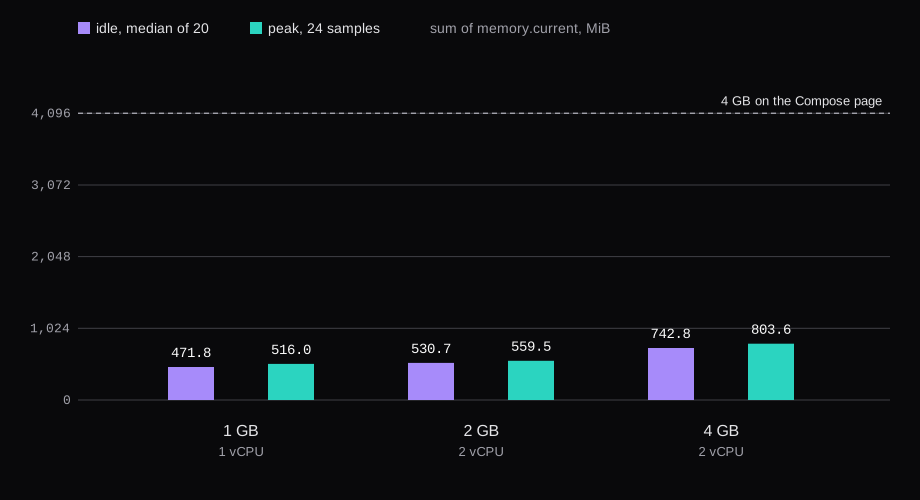
How much RAM does self-hosted n8n need?
Three official lines are easy to put side by side and hard to reconcile if you treat them as the same machine.
The Compose install page says: "At least 4 GB of RAM and 2 vCPUs. The sandbox that runs AI-generated code (sandbox-runner-1) uses Docker-in-Docker, which needs more headroom than a typical container."
Hostinger's VPS guide says: "You need at least 2 GB of RAM. While n8n can run on 1 GB, we don't recommend it, as you can easily encounter memory errors, even with simple workflows." The minimum they list is 1 vCPU, 2 GB of RAM, and 20 GB of SSD. The recommended spec on the same page is 2 or more vCPUs and 4 or more GB.
The OEM prerequisites use a cloud example: "An n8n Cloud instance at idle requires ~100MB." The memory row in that section is "320 MB - 2 GB", and it notes that a Code node keeps a pre-processing copy and a post-processing copy of the data. The ~100MB line is that cloud instance at idle. A Compose stack with Caddy on a VPS landed at 471.8 MiB before any workflow ran.
I would not buy from the idle number. The editor had to load, and these 20 workflows had to finish, with no heap error and no OOM kill. A workflow that pulls a large API payload, or a Code node that copies it, is the case Hostinger is warning about. These 20 workflows did not produce that error.
What the 4 GB Compose line is for
The 4 GB sentence sits on the page that builds the Assistant stack: sandbox certificates, a sandbox API, a privileged sandbox-runner-1 container running Docker-in-Docker, n8n, task runners, and SearXNG. I did not install that file. The twenty workflows have no AI nodes and no Code node.
The stack I measured is n8nio/n8n:stable and caddy:2, SQLite on the n8n volume, swap off. docker ps showed n8n-n8n-1 and n8n-caddy-1. There was no sandbox-runner-1. The n8n log said Sandbox: enabled=false provider=n8n-sandbox (from env). The Python task runner in internal mode failed because Python 3 is missing from the image. A JavaScript task runner did start as a process inside the n8n container, 92.0 MB of smem PSS on the 2 GB guest.
services:
  caddy:
    image: caddy:2
    restart: unless-stopped
    ports:
      - "80:80"
      - "443:443"
    volumes:
      - ./Caddyfile:/etc/caddy/Caddyfile:ro
      - ./www:/srv:ro
      - caddy_data:/data
      - caddy_config:/config
  n8n:
    image: n8nio/n8n:stable
    restart: unless-stopped
    env_file:
      - ./n8n.env
    volumes:
      - n8n_data:/home/node/.n8n
Caddy terminated HTTPS for n8n.lab.test and proxied to n8n:5678. Port 443 on the guest is the webhook URL, https://n8n.lab.test/. The env file was mode 600. It held N8N_ENCRYPTION_KEY. n8n's deployment variables say to provide a custom key used to encrypt credentials in the n8n database, and that n8n otherwise generates a random key on first launch. Credentials saved in that database cannot be decrypted without the key, so the value stays in that file. Behind Caddy, set N8N_WEBHOOK_URL=https://n8n.example.com/ (replacing the older WEBHOOK_URL) and N8N_PROXY_HOPS=1 so the editor and external services see the public HTTPS origin, not :5678 (webhook reverse-proxy docs). Back up the encryption key with the data volume; a restore without it leaves credentials undecryptable (backup docs).
n8n --version was 2.45.7. The image digest was sha256:9a8d8dcea75667496695d7810d7e1fe018a65efb36cc499d347f3931b3957b5d. Node inside the image was v26.12.1. Caddy's digest was sha256:36c24ad91a7ff7bc4c87fe22bfa8df3c4b18da0773d73fc12ee2c52b98c0bb7e.
n8n on 1 GB, 2 GB and 4 GB
The guest was Ubuntu 24.04.5 LTS, kernel 6.8.0-147-generic, Docker 29.1.3, KVM, one 32 GB disk, swap off. The three boots were qemu -m 1024 -smp 1, qemu -m 2048 -smp 2, and qemu -m 4096 -smp 2. MemTotal read 984,540 kB, 2,014,840 kB, and 4,009,844 kB. Same image, same volume, same workflows.
Each idle window followed the same steps I used for Nextcloud on a VPS. Finish owner setup, open the editor, wait ten minutes, then twenty rounds of cgroup memory.current, thirty seconds apart, plus docker stats and smem. The idle column is the median of those twenty sums. The run column is the peak of 24 samples taken every five seconds.
The twenty workflows are dull on purpose. Ten are a webhook that answers with the JSON you posted. Five are a schedule, once a minute, that sets one variable. Five are a webhook that fetches a local 1 MB file from Caddy at http://caddy/1mb.bin. No SaaS, no AI nodes. The file webhooks answer as soon as the request is received, so the HTTP body was 34 bytes, and the execution record still came back success after the fetch. Every webhook in the run returned HTTP 200. Every workflow name had at least one success row and no error row.
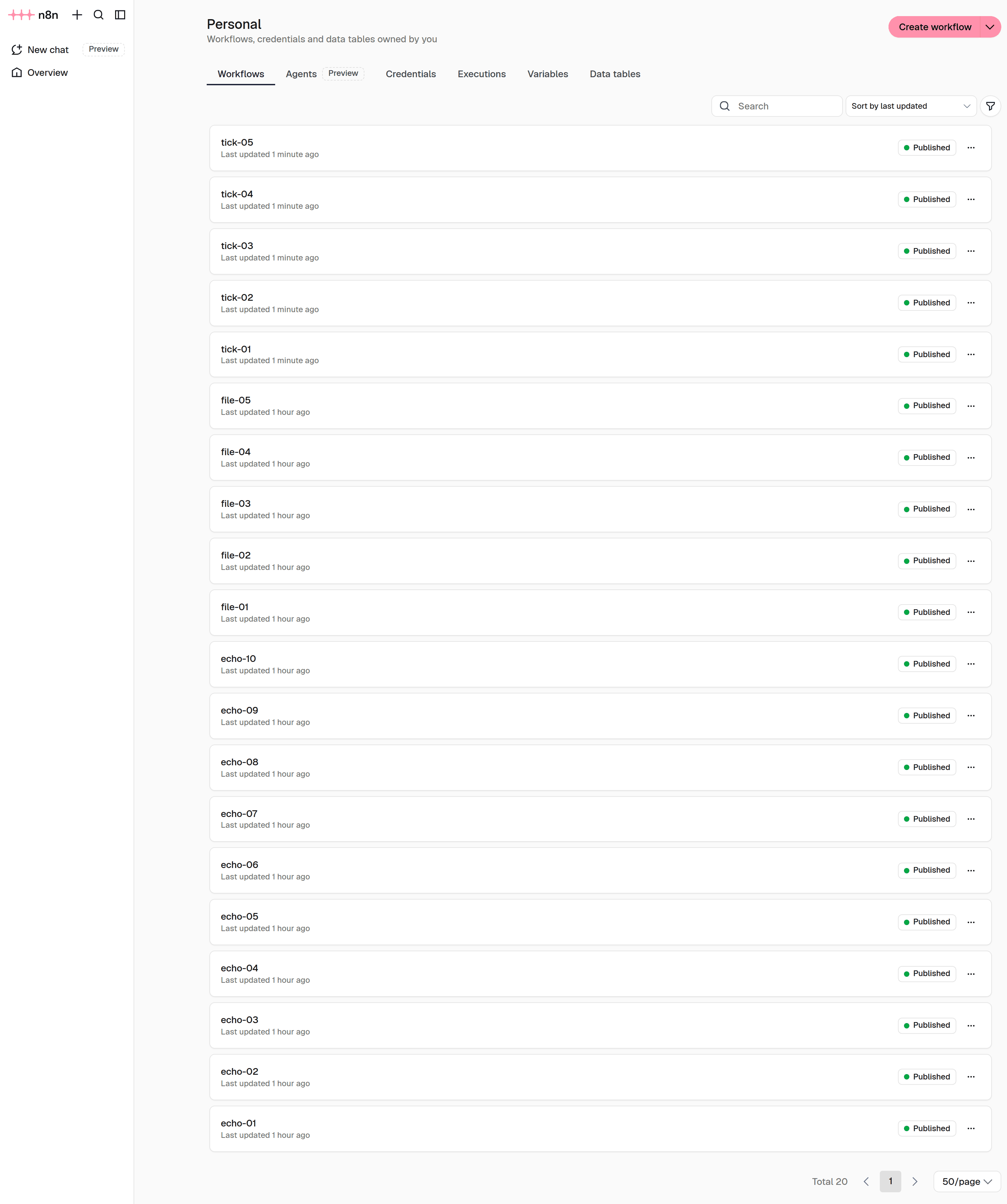
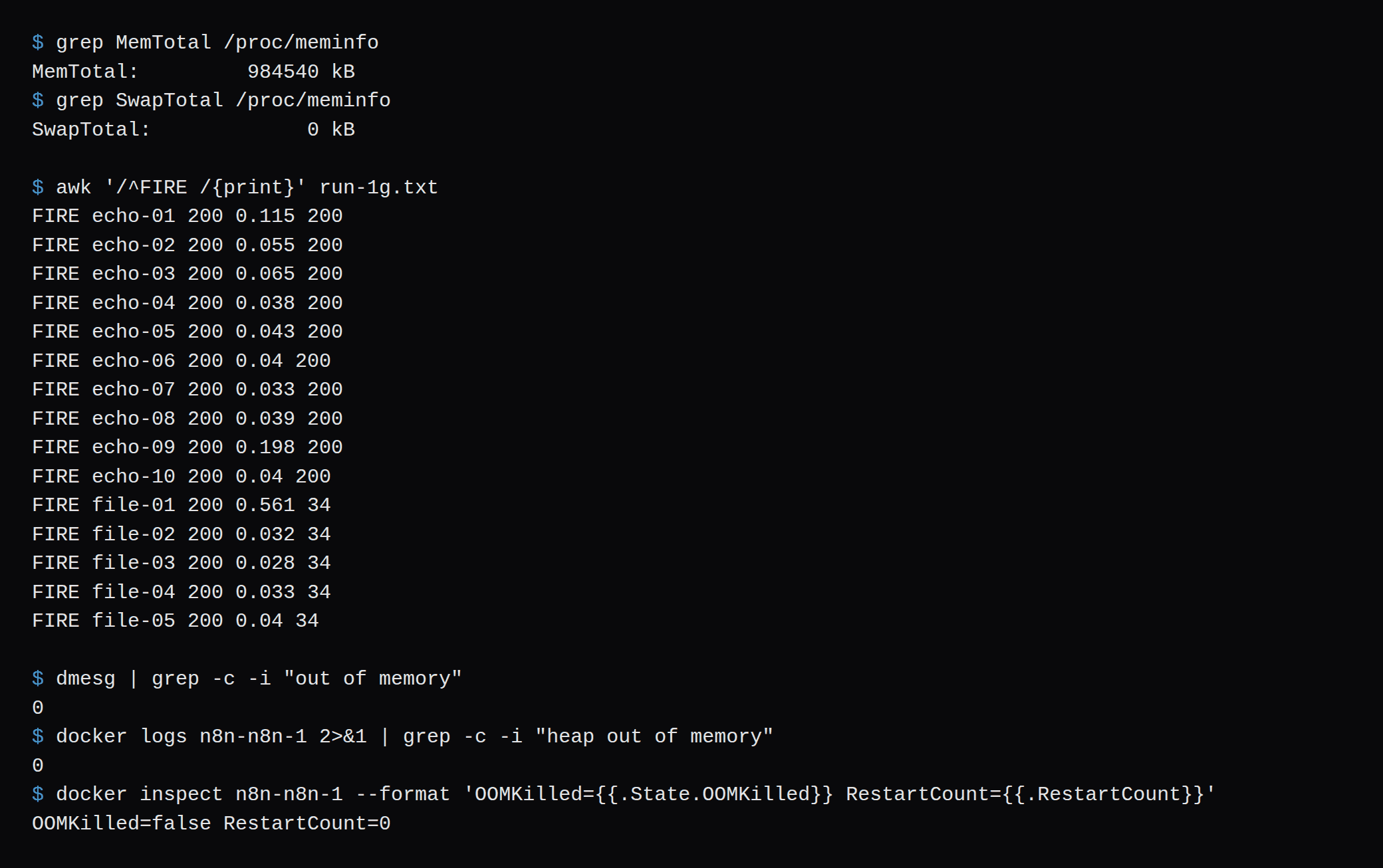
On the 1 GB guest the idle sum stayed between 467.4 and 477.4 MiB. n8n's container median was 448.6 MiB and Caddy's was 23.2. smem PSS was 314.4 MB for n8n, 69.5 MB for the task runner, 50.2 MB for dockerd, and 18.4 MB for Caddy. MemAvailable at the end of the quiet window was 234,764 kB, against a MemTotal of 984,540 kB.
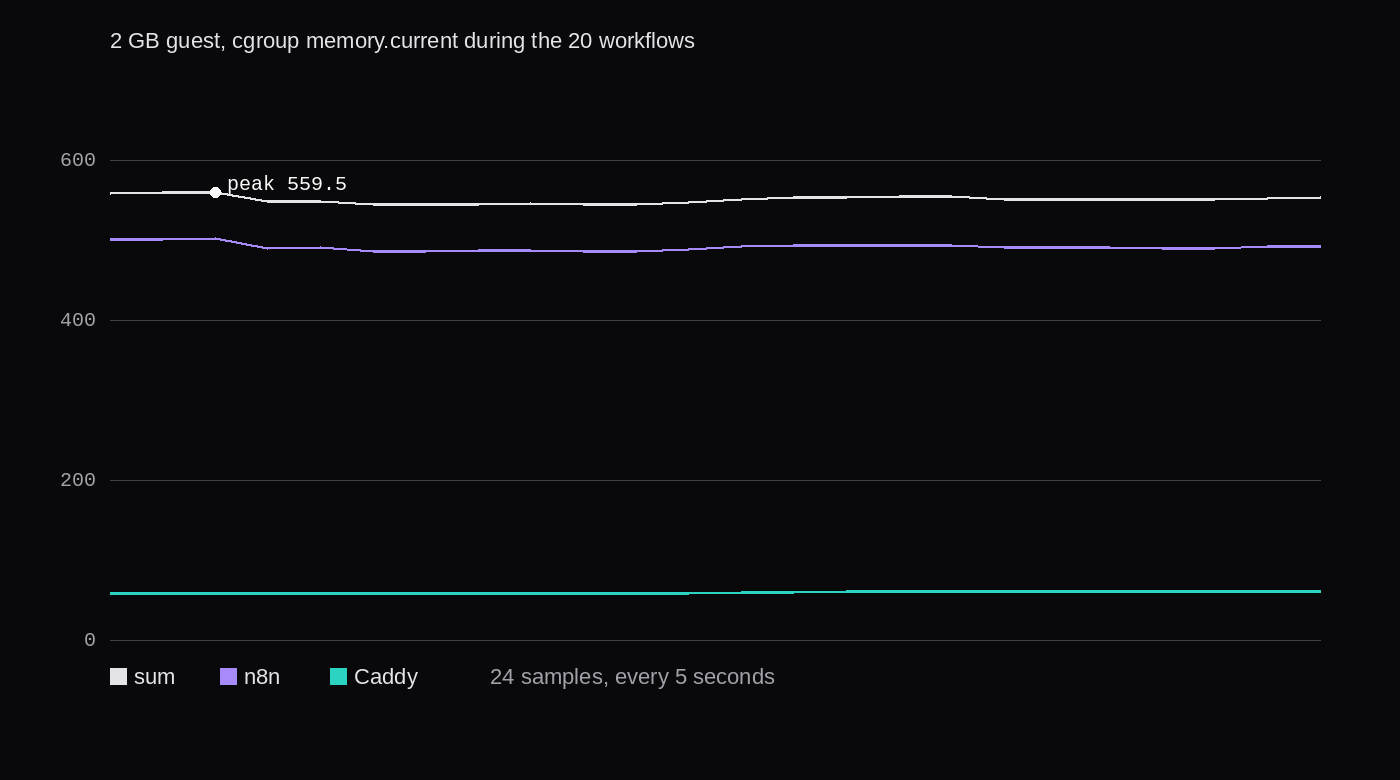
The 2 GB guest, untuned, had n8n at 328.5 MB PSS and the task runner at 92.0 MB. The 4 GB guest had n8n at 338.9 MB and the task runner at 92.2 MB, while the cgroup sum sat at 742.8 MiB. From the 2 GB guest to the 4 GB guest the n8n process went from 328.5 MB to 338.9 MB. The cgroup sum went from 530.7 MiB to 742.8 MiB, because memory.current also charges the container's page cache, and the bigger guest had room for cache.
A VM graph is one step further out. The Graphs tab is CPU, memory, and network for the whole guest, kernel and dockerd included. The chart is the containers during the 2 GB run.
n8n queue mode memory with Postgres and Redis
Queue mode is a second compose, and I only brought it up on the 4 GB guest. The queue docs say: "Running n8n with execution mode set to queue with an SQLite database isn't recommended." This compose is Postgres and Redis. EXECUTIONS_MODE=queue is set on the main container and on the worker. The worker's command is worker. Both use the same encryption key. Redis is QUEUE_BULL_REDIS_HOST=redis.
services:
  postgres:
    image: postgres:16
    env_file:
      - ./postgres.env
  redis:
    image: redis:7
  n8n:
    image: n8nio/n8n:stable
    env_file:
      - ./n8n.env
      - ./queue.env
  n8n-worker:
    image: n8nio/n8n:stable
    command: worker
    env_file:
      - ./n8n.env
      - ./queue.env
queue.env sets DB_TYPE=postgresdb and the DB_POSTGRESDB_* variables from the database environment page. The password file was mode 600. I imported the same 20 workflows into the new database, opened the editor, and took the same 20 idle rounds. I did not run the webhook burst again. This row is the idle cost of the extra containers.
| Container | Idle memory.current |
|---|---|
| n8n main | 441.1 MiB |
| n8n worker | 298.8 MiB |
| Postgres 16.15 | 134.3 MiB |
| Caddy | 17.6 MiB |
| Redis 7.4.12 | 3.6 MiB |
| Sum | 895.4 MiB, median of 20 |
The n8n log on startup said: "Postgres 16 is outside the supported range and receives compatibility support only. Upgrade to Postgres 17 or newer." The import still completed, and the worker logged that the instance registered. If you copy this compose, use Postgres 17 or newer, which is what that line asks for. The 134.3 MiB is Postgres 16.15 on a fresh database.
smem printed 1.1G for the whole 4 GB guest on every round, which is 1,126.4 MiB at that one-decimal rounding. The worker process was 235.2 MB, the main n8n process 315.2 MB. The 2 GB guest's MemTotal is 2,014,840 kB, 1,967.6 MiB. The container sum of 895.4 MiB leaves 1,072 MiB of that MemTotal, and the rounded smem total fits as well. I did not boot this compose on the 2 GB guest. The fit is those two measurements set next to MemTotal. Postgres with PgBouncer is the next step once the database has more clients than one n8n process. One user on the default SQLite volume is not that step.
The pricing page lists "Queue mode for scaling" on Business, at 667€ a month billed annually. The worker I started is the same n8nio/n8n:stable image, command worker, and it stayed up. Viewing workers in the UI, and running more than one main process, are marked Enterprise on the queue page. This lab used one main and one worker.
The n8n heap flag on a 2 GB guest
Fixing memory issues names the log line Allocation failed - JavaScript heap out of memory, and tells you to set --max-old-space-size=SIZE on the CLI or in NODE_OPTIONS. The page does not pick SIZE. I had not seen that line on any of the three guests. The separate row is still the flag, on the 2 GB guest only, at 1024.
NODE_OPTIONS=--max-old-space-size=1024Before that line, a second node process in the container reported heap_size_limit of 1,082,130,432 bytes, 1,032 MiB. After the recreate, with the variable set, the same check reported 1,124,073,472 bytes, 1,072 MiB. Old space of 1024 MB plus the young generation is the higher number. On this 2 GB guest Node's own default was already near 1024 MB of heap, so the flag did not pull the ceiling down. On the 4 GB guest, with no NODE_OPTIONS at all, the same check reported 2,153,775,104 bytes. The ceiling follows the guest. The workflows stayed under both ceilings. The peak container sum on 4 GB was 803.6 MiB.
After the recreate the idle sum was 478.8 MiB, with n8n's container at 424.8, against 530.7 and 472.6 untuned. smem's n8n process was 330.1 MB, against 328.5 MB untuned. The process stayed put. The cgroup number dropped, which is what a fresh container looks like before the page cache fills. The run peaked at 541.9 MiB, all 20 workflows succeeded, and Allocation failed - JavaScript heap out of memory still did not show up. 1024 is a SIZE that fit this guest if you are already looking at that log line. These 20 workflows had already finished on the untuned guests.
n8n Cloud Starter and a VPS
Starter is 20€ a month, billed annually, with 2.5K workflow executions, unlimited steps, 1 shared project, and 5 concurrent executions. Pro on the same page is 50€ a month billed annually for 10K executions. The page has a monthly and annual toggle. The amount I could read without guessing a discount was the annual one.
A 2 GB or 4 GB VPS on NodeRings does not have one published price. The marketplace filters plans by region, specs, price, and billing, and the price on the row is the provider's. I am not filling that cell in with a number from somewhere else.
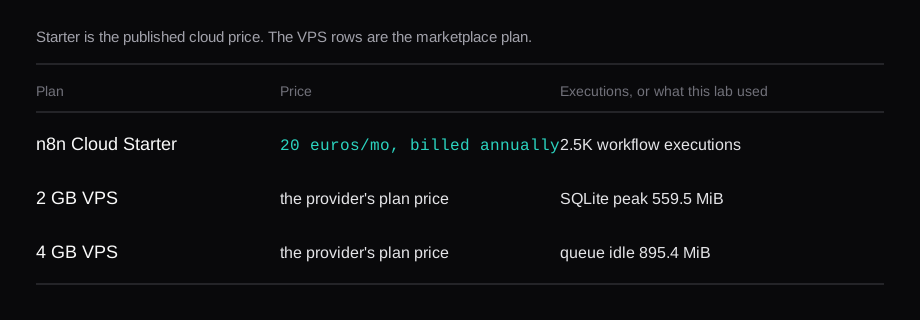
For this workload the 1 GB guest finished and the 2 GB guest had more left over. Pay for 4 GB if you are enabling the Assistant sandbox, or you want the queue stack beside Postgres, or the workflows hold more than a 1 MB file and a JSON echo. Starter at 20€ is the bill for executions and for hosting you do not patch yourself.
FAQ
Can n8n run on 1 GB of RAM?
These 20 workflows finished on the 1 GB guest. Idle was 471.8 MiB, the peak was 516.0 MiB, the editor loaded, and the container was not killed. Hostinger still writes that 1 GB runs into memory errors on simple workflows. A Code node holding a large payload is the case that sentence describes. This lab did not run one.
Does self-hosted n8n need 4 GB?
The Compose page asks for 4 GB and 2 vCPUs because sandbox-runner-1 runs Docker inside Docker. With the sandbox left at the default, the log said it was disabled, and the 4 GB guest's n8n process was 338.9 MB of PSS. The cgroup sum was higher, 742.8 MiB idle, because the container's cache grew with the guest.
Should one user pick SQLite or Postgres?
The 20 workflows ran on SQLite, which is n8n's default DB_TYPE. Queue mode is the point where the docs tell you to leave SQLite. One user who is not splitting work onto a worker can stay on the volume that shipped with the container. The encryption key still matters on SQLite: lose the key and the saved credentials in that file stay unreadable.
Does n8n queue mode fit on 2 GB?
On the 4 GB guest the worker container idled at 298.8 MiB and the five containers together at 895.4 MiB. smem printed 1.1G for the guest. The 2 GB guest reports 1,967.6 MiB of MemTotal, and both of those figures sit under it. I did not start the queue compose on that 2 GB guest, so there is no webhook peak from there. Postgres 16.15 also logged that it is outside the supported range.
How do you set the n8n memory limit?
NODE_OPTIONS=--max-old-space-size=1024 on the 2 GB guest moved a second Node process from a 1,032 MiB heap limit to 1,072 MiB. smem's n8n process stayed at 330 MB. The flag is the documented response to Allocation failed - JavaScript heap out of memory. That string was not in the log of any guest in this lab, including the 1 GB one.