
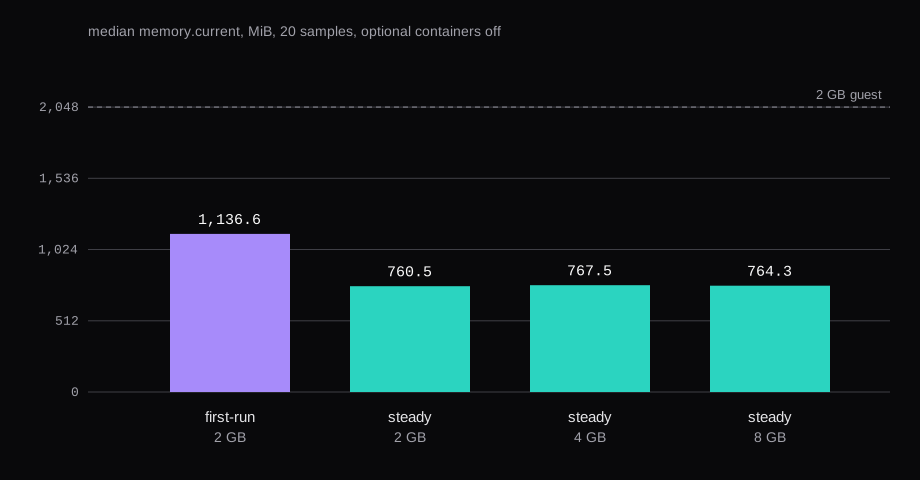
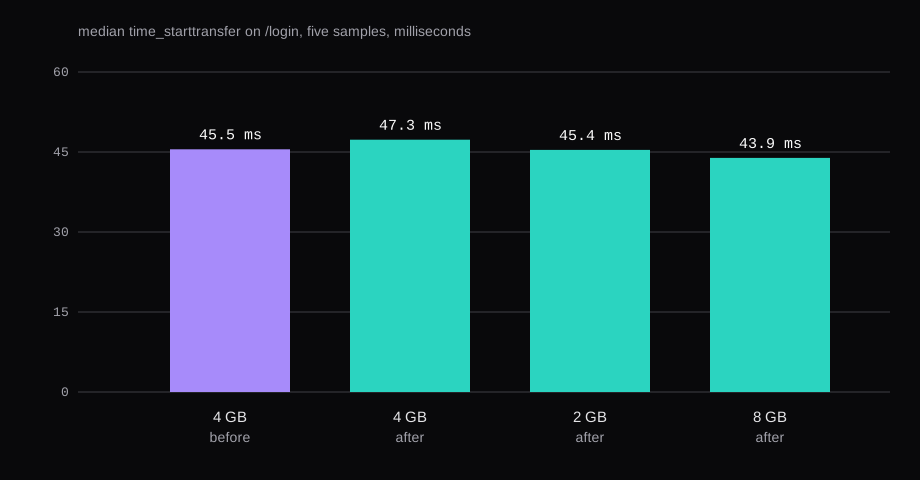
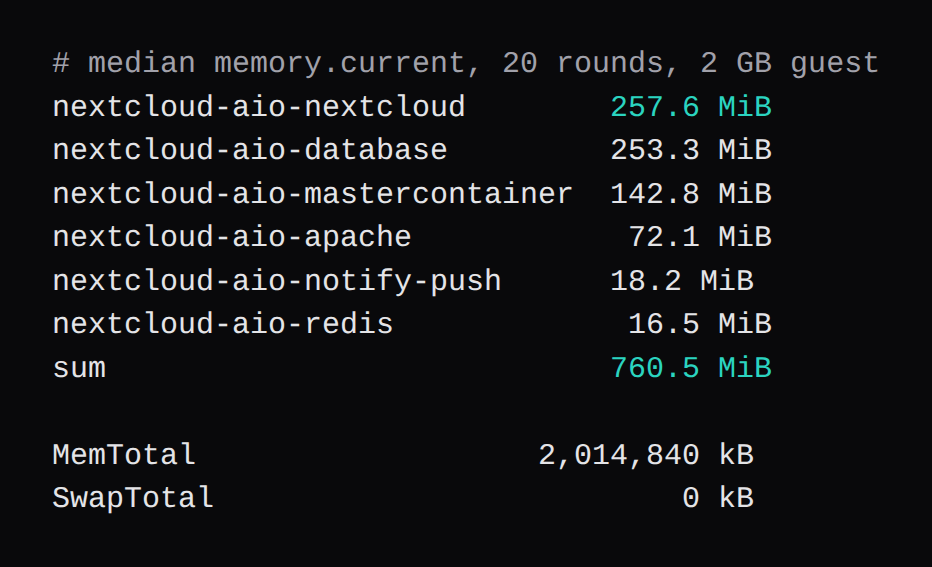
After one reboot, Nextcloud All-in-One on a 2 GB KVM guest held a median 760.5 MiB. The same disk, every optional container still off, held 767.5 MiB on a 4 GB guest and 764.3 MiB on an 8 GB guest with four vCPUs. A warm /login was 45.4 ms on that 2 GB guest, 45.5 ms on the 4 GB guest before the pool edit, and 43.9 ms on the 8 GB guest. The quiet window taken right after first-run, before that reboot, was 1,136.6 MiB. The Nextcloud container was 923.2 MiB of it, and 257.6 MiB once the guest had been rebooted.
The optional-containers screen in AIO states its own floor. "When any optional container is enabled, at least 2GB RAM, a dual-core CPU and 40GB system storage are required. When enabling ClamAV, Nextcloud Talk Recording-server or Fulltextsearch, at least 3GB RAM are required." The same paragraph asks for 5 GB and a quad-core CPU with everything enabled, and recommends at least 1 GB more than that minimum. The Linux install notes say the instructions are valid for a PC with at least 4 GB of RAM and two cores. Collabora, ClamAV, Talk, imaginary, fulltextsearch, and the whiteboard stayed off. The 2 GB line on that screen applies once an optional container is enabled. First-run finished with SwapTotal at 0, and dmesg counted zero out-of-memory lines.
| Guest | vCPU | Optional containers | Idle memory.current | /login TTFB | |
|---|---|---|---|---|---|
| Right after first-run | 2 GB | 2 | off | 1,136.6 MiB, median of 20 | 50.9 ms |
| After a reboot | 2 GB | 2 | off | 760.5 MiB, median of 20 | 45.4 ms |
| Before the pool edit | 4 GB | 2 | off | 767.5 MiB, median of 20 | 45.5 ms |
| After the pool edit | 4 GB | 2 | off | 759.3 MiB, one reading | 47.3 ms |
| After the pool edit | 8 GB | 4 | off | 764.3 MiB, median of 20 | 43.9 ms |
Nextcloud AIO on a small VPS
The guest was Ubuntu 24.04.5, kernel 6.8.0-147-generic, Docker 29.1.3, KVM, on a 48 GB qcow2 disk. The three boots were qemu -m 2048 -smp 2, qemu -m 4096 -smp 2, and qemu -m 8192 -smp 4. MemTotal read 2,014,840 kB, 4,009,852 kB, and 8,131,764 kB. Swap stayed off on all three.
The mastercontainer image was ghcr.io/nextcloud-releases/all-in-one:latest, digest sha256:89e6b84333a6d01236fab07a006fb9b06ed166bbf08cb58446b599900541c3c9. The Nextcloud image was ghcr.io/nextcloud-releases/aio-nextcloud:latest, digest sha256:78d2a376d482277af7db66967dfd767c061fb322062a6f88b20b70ba96d60893. occ status reported version 34.0.5.1 and versionstring 34.0.5. PHP was 8.4.27. The Hub checkbox on the AIO screen was left off.
AIO's base set was Nextcloud, Postgres, Apache, the mastercontainer, Redis, and notify-push.
sudo docker run -d --init --sig-proxy=false \
  --name nextcloud-aio-mastercontainer --restart always \
  --publish 8080:8080 \
  --env APACHE_PORT=11000 \
  --env APACHE_IP_BINDING=0.0.0.0 \
  --env APACHE_ADDITIONAL_NETWORK= \
  --env SKIP_DOMAIN_VALIDATION=true \
  --volume nextcloud_aio_mastercontainer:/mnt/docker-aio-config \
  --volume /var/run/docker.sock:/var/run/docker.sock:ro \
  ghcr.io/nextcloud-releases/all-in-one:latest
SKIP_DOMAIN_VALIDATION=true is in that command because the name was cloud.lab.test. It is a lab name, and the host sits behind NAT. AIO's readme answers "Are self-signed certificates supported for Nextcloud?" with no. Apache listened on port 11000. Every timing is HTTP from the guest to 127.0.0.1:11000, with Host: cloud.lab.test and X-Forwarded-Proto: https.
Each idle window followed the same steps. Finish first-run, open the dashboard once, wait ten minutes, then take twenty readings of cgroup memory.current, thirty seconds apart. The idle column is the median of those twenty sums. The readings are cgroup memory.current.
The Nextcloud container accounts for that high first window, 923.2 MiB against 257.6 MiB after the reboot on the same disk. Postgres went the other way, 86.7 MiB to 253.3 MiB, and the mastercontainer went from 52.5 MiB to 142.8 MiB. The 4 GB guest, still on two vCPUs, and the 8 GB guest on four, landed within a few MiB of 760.
A 2 GB VM is the size this layout fit. The marketplace is where the plan is chosen. Turn an optional container on and that screen asks for the 2 GB line, plus the extra gigabyte it recommends.
PHP-FPM settings Nextcloud AIO ships
The AIO readme says each PHP process defaults to a max of 512 MB, changed with NEXTCLOUD_MEMORY_LIMIT on the mastercontainer. This one had PHP_MEMORY_LIMIT=512M. The pool file was already pm = ondemand, pm.max_children = 5000, and pm.process_idle_timeout = 300s. The server tuning manual describes a stock pool of pm.max_children = 5. That number lives in the generic PHP-FPM story. AIO's www.conf is the file this container was running.
The manual's formula is pm.max_children = floor(available RAM for PHP / average worker RSS), and it puts a typical worker around 50 to 100 MB. It wants dynamic mode for Nextcloud, because desktop and mobile clients poll about every 30 seconds. Its idle timeout for ondemand defaults to 10 seconds, so a poll that arrives after the worker has exited pays a cold start. AIO's timeout is 300 seconds, and the pool was already ondemand. The mode stayed.
One worker, before the edit, was 105,456 KB RSS. The php-fpm master beside it was 64,828 KB. Divide a 512 MB budget by that 103 MB and the floor is 4. Divide the same 512 MB by a 128 MB memory_limit and the floor is 4 again. A process allowed to grow to 512 MB can fill that budget alone, which is what pm.max_children = 5000 next to 512M is willing to start.
Two lines changed. In the container, pm.max_children went from 5000 to 4, and a new file set the FPM admin limit.
docker exec nextcloud-aio-nextcloud \
  sed -i 's/^pm.max_children = 5000/pm.max_children = 4/' \
  /usr/local/etc/php-fpm.d/www.conf
docker exec nextcloud-aio-nextcloud sh -c \
  'printf "%s\n" "php_admin_value[memory_limit] = 128M" > /usr/local/etc/php-fpm.d/zz-memory.conf'
The php-fpm master was then reloaded with kill -USR2. /login still returned HTTP 200. The worker after the reload was 75,672 KB RSS, and the master was 64,784 KB. Each of those RSS figures is a single ps reading.
OPcache was already on, and the Redis lines were already in config.php. opcache.enable was On, opcache.memory_consumption 256, opcache.max_accelerated_files 20000, opcache.revalidate_freq 60, opcache.jit disable. memcache.local pointed at APCu, memcache.distributed at Redis, memcache.locking at Redis. Those were already the running values.
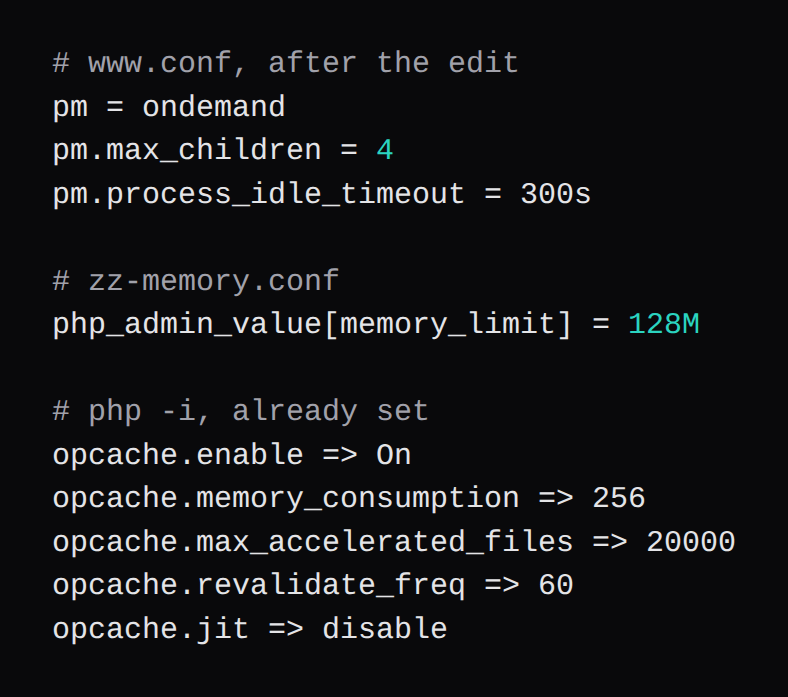
The system requirements say Nextcloud needs a minimum of 128 MB RAM per process, and recommend a minimum of 512 MB. The 128 MB here is that minimum, so four children fit inside the 512 MB the readme already gives one process. A preview or a conversion that wants more than 128 MB will hit the cap. The supported knob, from the readme, is NEXTCLOUD_MEMORY_LIMIT on the mastercontainer, and that was left at 512M. The override sits in the Nextcloud container's writable layer. Recreating the container drops it. The qemu reboots kept the layer, which is why the 8 GB boot and the second 2 GB boot still showed pm.max_children = 4.
One reading on the 4 GB guest, taken after the reload, summed to 759.3 MiB. The pool change left the idle sum where the twenty-sample median had been.
Nextcloud login time to first byte
curl -s -o /dev/null -w "%{http_code} %{time_starttransfer}\n" \
  -H "Host: cloud.lab.test" \
  -H "X-Forwarded-Proto: https" \
  http://127.0.0.1:11000/login
Five samples, the median of time_starttransfer, every one HTTP 200, run on the guest. The login document was about 19 KB. The timer is the wait before Apache sent the first byte.
On the 4 GB boot the first sample after startup was 0.570 seconds. The next four sat between 0.044 and 0.047. A warm set, taken on that same boot just before the pool edit, was 0.059588, 0.045459, 0.044805, 0.044686, 0.045562. The median is 0.045459 seconds, 45.5 ms. After the USR2 reload the five samples were 0.407990, 0.045890, 0.047316, 0.054629, 0.044149, all HTTP 200. The median is 0.047316 seconds, 47.3 ms. The 0.408 second sample is the first request after the workers were replaced. That is the cold start the tuning manual describes, on that one request. The steady 2 GB median was 45.4 ms. The 8 GB median was 43.9 ms.
Why the Nextcloud Files app stays heavy
Õunapuu measured a clean page load at about 15 to 20 MB of JavaScript, compressing to about 4 to 5 MB on the wire. core-common.js on that install was 4.71 MB. The Files app was 18.8 MB of JavaScript.
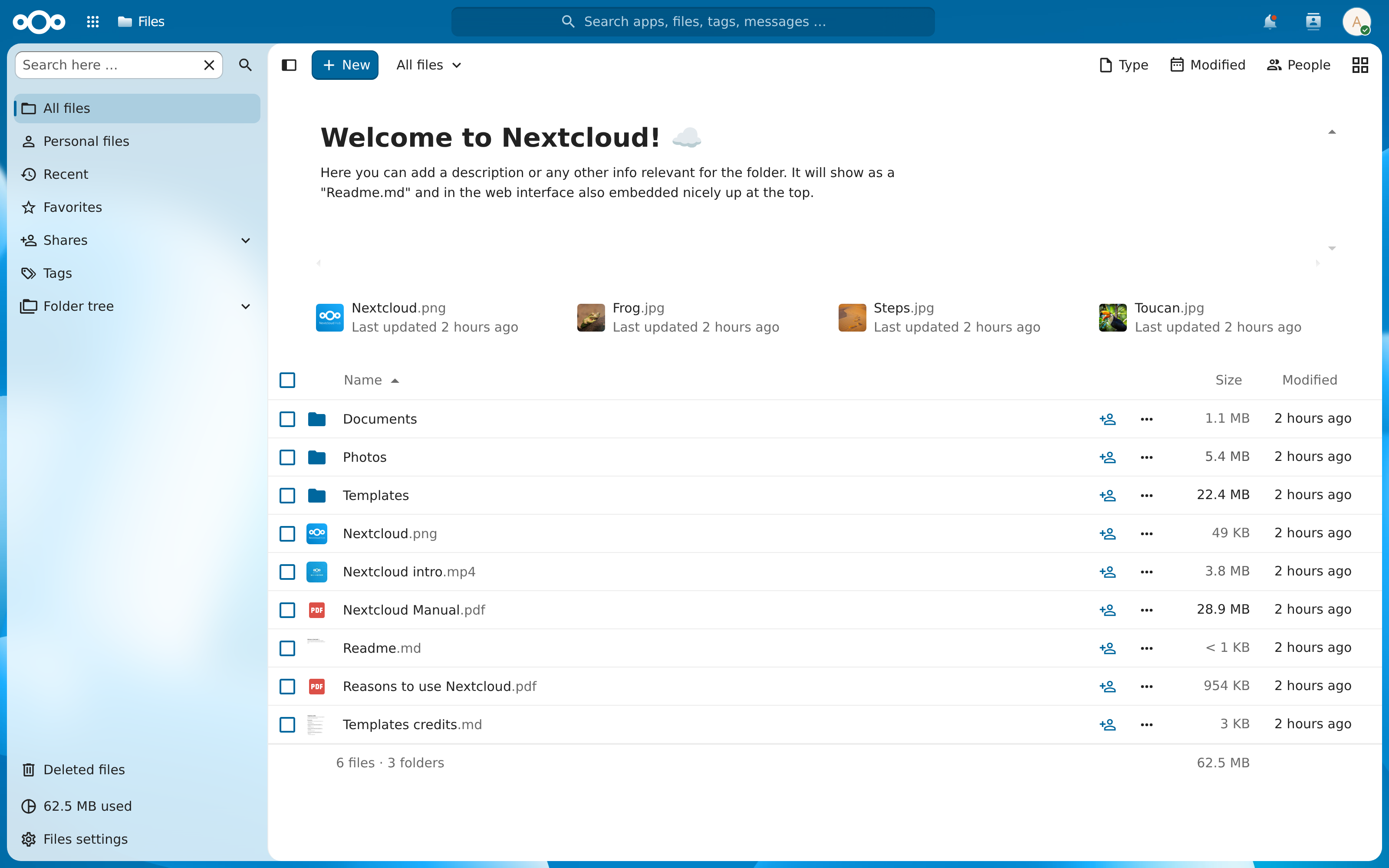
On this install, /apps/files/ was 43,936 bytes of HTML and 49 script URLs. The scripts summed to 14,233,566 bytes, 13.57 MiB, counted as the response bodies. core-common.js was 5.53 MiB of that. The dashboard's scripts summed to 10,137,937 bytes. These sizes are the response bodies, uncompressed, from a different install than the 4.71 MB and 18.8 MB figures.
The pool, opcache, and Redis are the wait before that first byte. The browser then fetches the scripts. Photos belong in Immich, and passwords in Vaultwarden. Files and the calendar are what this guest was keeping.
Is 2 GB enough for two people on Nextcloud?
The 2 GB guest, after the reboot, one dashboard login, and ten quiet minutes, sat at 760.5 MiB out of a MemTotal of 2,014,840 kB. Swap was off. The out-of-memory count in dmesg was 0. The warm login was 45.4 ms, from one admin session. The pool will spawn at most four workers, and the one worker measured on a login was 74 MB. Discussion 1335 is where the requirements paragraph sends you for further sizing. That page is a separate recommendation from these readings.
Does a VPS memory graph show PHP?
The Graphs tab on a VM is CPU, memory, and network for the whole guest. Container splits and PHP children sit outside that tab. The figure is the six containers on the steady 2 GB guest. Ubuntu and the page cache live in the same machine the graph draws, and outside these cgroups.
What if ClamAV or Collabora is enabled?
The screen's own sentence becomes the floor. Any optional container means at least 2 GB, two cores, and 40 GB of disk, and the recommendation on that screen is 1 GB more. ClamAV, Talk recording, or fulltextsearch moves the printed line to 3 GB. The ClamAV checkbox says it needs about 1 GB of additional RAM. Everything enabled at once is 5 GB and four cores. Those containers stayed off for every reading in this run.