
You finish the WHMCS product. Template, cores, disk, price. The last screen asks for a Username and a Password. You are not logging in as a person. You are pasting a Proxmox API token into a billing server that sits somewhere else on the internet.
That paste is the whole story. Not the brand of the module. Not whether the host uses KVM or LXC. The secret that can create and destroy guests now lives in a database outside the cluster that owns those guests.
What the module asks you to type
Take a widely used path. ModulesGarden's Proxmox VE module for WHMCS supports API tokens. After you generate one in Proxmox, you get a Token ID and a Secret. The docs tell you to put the Token ID in the Username field and the Secret in the Password field. Then comes the line that should make a careful operator pause:
For proper module functionality, use API tokens with full access permissions. Limited scopes may block some API requests required by the module.
So the integration does not want a narrow key. It wants a key that can reach the calls the module makes, and it wants that key stored where WHMCS stores server credentials. That is a normal design for a billing plugin. It is also a boundary crossing. The hypervisor's control plane secret has left the hypervisor's trust domain.
None of this is unique to one vendor. Any panel that talks to Proxmox from the outside needs some credential. The interesting part is how much power that credential carries, and where the bytes end up.
What a Proxmox token actually is
Proxmox's user management chapter is clear about tokens. They give other software a way to call most of the REST API without logging in as a person. Consoles are the exception: those endpoints need user privileges and refuse tokens. Tokens can expire. If one leaks, you can revoke it without disabling the user.
There are two kinds.
Separated privileges is the default for new tokens. You attach ACLs to the token itself. Effective rights are the intersection of what the user may do and what the token may do. Lose the token and you still have a user account with a password. Lose the password and you can still revoke the token.
Full privileges turns privilege separation off. The token inherits everything the user has. Proxmox's own wording is careful: disable separation only when the integration genuinely needs the user's full permissions.
So "API token" is not a single level of trust. A privilege-separated token on a dedicated automation user is one thing. A full-privilege token on a powerful account is closer to handing the cluster a second root login that never types a password.
People sometimes assume that minting a token for root@pam is the same as being root. Proxmox staff have said otherwise in public. In a forum thread about restricted root tokens, Fabian explains that some parameters check for the literal root@pam identity, and that check does not include tokens belonging to root. Hookscripts are called out as a special case: they run privileged, can be triggered by ordinary guest actions, and setting them needs the highest privileges. A token for root is still a token. It is not the root session.
That distinction matters when someone tries to "just use root for WHMCS" and then wonders why half the API fails, or why turning privilege separation back on breaks the module. The API is not confused. The caller stopped being root in the sense the code checks for.
Modules disagree about how much access they need
This is not settled folklore. Different integrations draw the line in different places.
ModulesGarden, as above, documents full access because limited scopes block calls it needs.
A community module, joaquinv98/whmcs-proxmox, moved the other way. Its current installation guide tells you to use a dedicated privilege-separated provisioning token, separate from the console token, and says plainly: do not silently substitute a root token. The security guide keeps the console broker on a narrow VM.Console path and treats the provisioning credential as a different secret with a different blast radius.
Same hypervisor. Same product category. Opposite advice about what you paste into billing.
The lesson for a host is not "pick the module with the prettier README." It is that the credential model is part of the product. If an installer needs a root-equivalent secret in WHMCS to clone a template, that is a design choice with a cost. If another installer refuses to pretend a root token is fine, that is also a design choice. You are choosing which trust story you are willing to operate.
The question that actually matters
Privilege separation on Proxmox is useful. Intersection ACLs are useful. Expiration dates are useful. None of them answer the question hosts ask when a marketplace or a reseller says "just send us an API token."
The question is: where does the secret live after you create it?
If it lives in WHMCS on a VPS you do not treat like a Proxmox node, then a stolen WHMCS database, a compromised admin session, or a backup that leaked is a hypervisor incident. Revoking the token helps after you notice. Until then, the attacker speaks Proxmox with whatever rights you granted.
If it lives next to software you installed in your own cluster, in a namespace a third party cannot read, then the same rights still exist. You still have to get the ACL list right. You still can over-grant. What you have changed is the attack path. Someone who owns the billing SaaS does not automatically own the token that talks to port 8006.
That is a smaller claim than "least privilege is solved." It is a larger claim than a marketing diagram with a lock icon. It is about the dashed line between the storefront and the hypervisor.
What we do with that line
When we built NodeRings, this was the objection we heard first. Hosts would rather keep an empty node than paste the keys to every machine into someone else's database. Fair.
So the order path never asks for that paste into our control plane. You install an agent on your side. You create a dedicated Proxmox user and a privilege-separated token for the operator that runs next to your hardware. The secret stays in your cluster. We write a short order into a namespace we can see. Your operator notices, talks to Proxmox on the local side of that dashed line, and the VM appears.
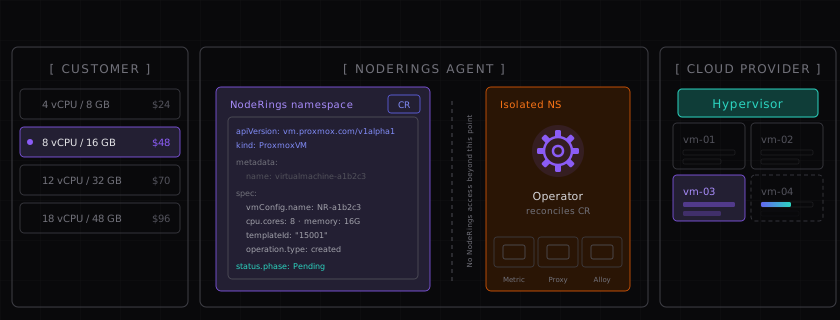
How that loop looks end to end is in How NodeRings works. The Proxmox connect steps are in the provider quick start.
We are not going to pretend that a privilege-separated role with VM.Allocate and friends is harmless. It can still empty a node if the agent is compromised. The point of the design is narrower: the token that can do that never gets typed into a form on noderings.com, and it never sits in our vault waiting for a support ticket.
If you already sell through WHMCS, keep WHMCS. Nothing here asks you to throw it out. Just notice what each integration asks you to store, and treat that storage location as part of your threat model. Full-access tokens in a billing panel and privilege-separated tokens on the hypervisor are not the same product, even when both say "API token" on the label.
The secret should stay where the machines are.