
TensorFold 1.2.1 on this guest printed a memory floor of 3.63 GiB for mlx-community/Qwen3.5-2B-MLX-4bit, and the serve that followed exited 1. stderr was tensorfold: no CUDA driver (DriverUnavailable). /usr/bin/time -v recorded a maximum resident set size of 247,040 kB and a wall time of 0:00.37. MemTotal was 984,552 kB, SwapTotal was 0, and ss -lnt showed no listener on 8080. The same binary, pointed at that repo before the checkpoint was in the Hugging Face cache, exited 1 at 3,840 kB. That line said the native engine does not download.
The binary is tensorfold-native from the v1.2.1 release, the linux-x86_64 archive, 160,737,032 bytes, sha256 90a87b019afff5c04bd74cc4d7240f4a0df1bfaccdaf414deded544e471cf40e. The tarball was 41,146,684 bytes, sha256 b069e8add95bc0f4a13ccb08bdd6689781242298f3e6ea1e719d8b02999dc605, and sha256sum -c printed OK. The guest was Ubuntu 24.04.5, kernel 6.8.0-147-generic, glibc 2.39, qemu -m 1024 -smp 1. nvidia-smi was absent from PATH, and /dev/nvidia* was absent. ldd listed linux-vdso.so.1, libc.so.6, libpthread.so.0, libdl.so.2, and the dynamic linker.
| On this guest | |
|---|---|
| Binary | tensorfold-native 1.2.1, backends cuda, chip null |
| Floor | info printed 3.63 GiB, weights plus a 2.00 GiB margin |
| Weights file | model.safetensors is 1,722,271,785 bytes |
| Serve, cache empty | exit 1, max RSS 3,840 kB, the engine does not download |
| Serve, cache present | exit 1, DriverUnavailable, max RSS 247,040 kB |
| Listen | ss showed no socket on 8080 |
What does the 1.2.1 binary report?
tensorfold-native --version printed tensorfold-native 1.2.1. capabilities --json came back schema 1, engine zig, that same version, chip null, and a backends array with one string, cuda. cuBLASLt, cuBLAS, and NCCL came back found: false, with sonames libcublasLt.so.13, libcublas.so.13, and libnccl.so.2. TensorFold grammar came back found. lib/libtfgrammar.so from the same archive was next to the binary, 3,123,360 bytes. RDMA verbs came back found because this image has /lib/x86_64-linux-gnu/libibverbs.so.1, a symlink to libibverbs.so.1.14.50.0.
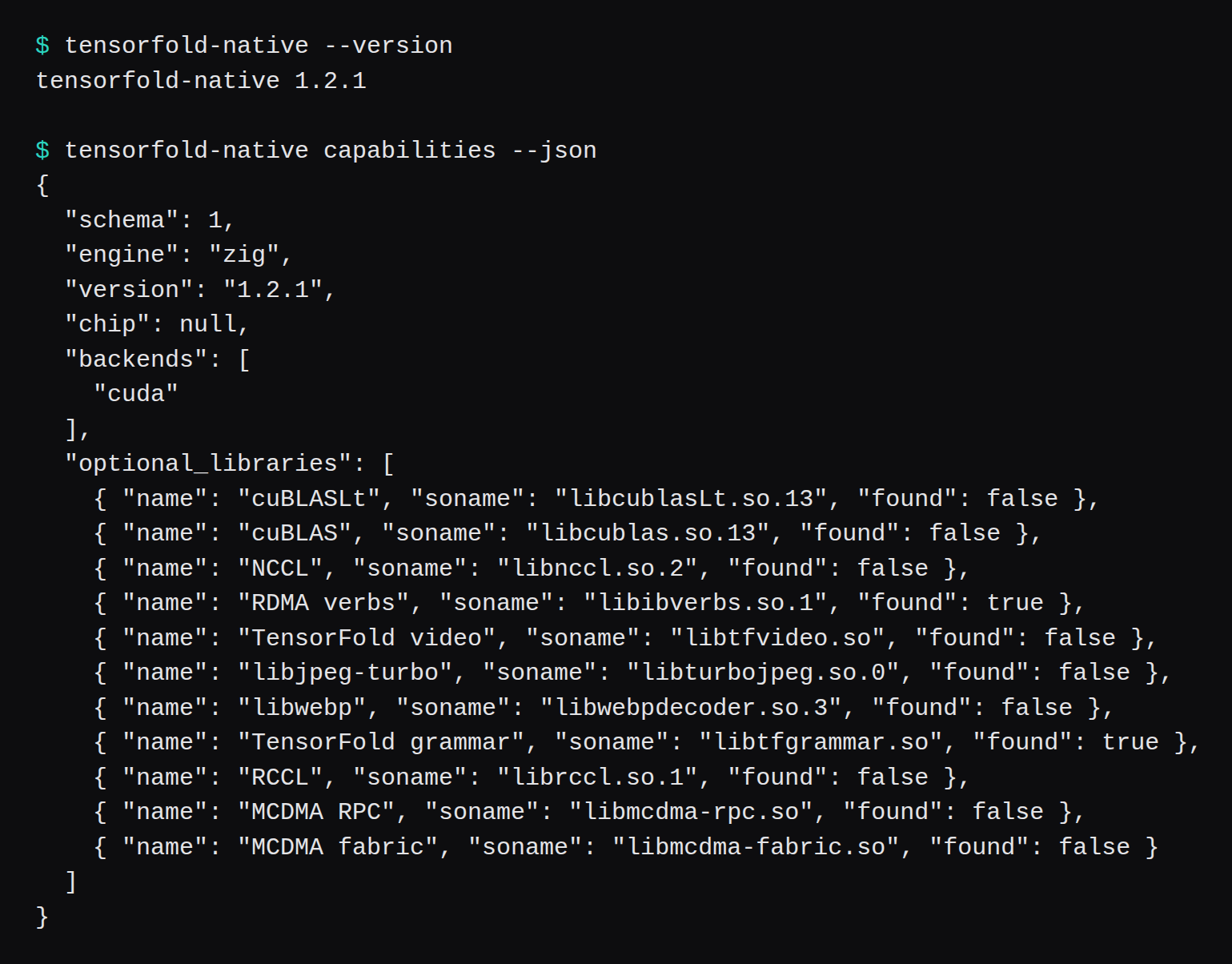
RUNTIME.md in the archive says found means the loader found a file. It keeps that mapping for the life of the process and skips creating a CUDA context. Capabilities exited 0 here. Serve is the command that asked for the driver.
The v1.2.1 README says the Linux archive needs glibc 2.28 or newer and NVIDIA driver R580 or newer, CUDA 13.0, providing libcuda.so.1. The kernels are built with CUDA 13, and the page says an older driver is refused at startup, with nvidia-smi as the way to read the installed one. glibc on this guest is 2.39, so the library floor cleared. Serve printed DriverUnavailable. The README's older-driver line is about a driver that is installed and behind R580. On this guest /dev/nvidia* was missing.
Why does serve say the native engine does not download?
I ran serve against the repo name before HF_HOME held the snapshot. Exit status 1. stderr was one line:
tensorfold: mlx-community/Qwen3.5-2B-MLX-4bit is not in the Hugging Face cache; the native engine does not download: run tensorfold pull mlx-community/Qwen3.5-2B-MLX-4bit first/usr/bin/time -v printed a maximum resident set size of 3,840 kB and a wall time of 0:00.00. The archive's RUNTIME.md says inference needs a model directory or an existing Hugging Face cache, and the file's line is "No model download occurs at startup." The serve line is that rule with the repo name filled in.

The flags were --name local-model --host 127.0.0.1 --port 8080 --no-thinking. The README's serve line also passes --context 8192. I left context off, so this resident set is the cache check.
What memory floor does info print for the 2B?
The README quick start pins the pull at mlx-community/Qwen3.5-2B-MLX-4bit@93760be4f1f69842a46bc13dbdc0f19e291392a3, then serves the repository name on its own. I ran that pull with HF_HOME=/tmp/tf-lab/hf on the machine outside the guest. It stored the revision, wrote model.safetensors as 1642.49 MiB in 52 pieces, and /usr/bin/time printed ELAPSED 88.40. The blob on disk is 1,722,271,785 bytes, the same size the Hugging Face tree API lists for model.safetensors at that revision. du -sh on the cache was 1.7G.
I copied the cache onto the guest and pointed HF_HOME at it. tensorfold-native info exited 0, with a maximum resident set size of 4,480 kB:
family: Qwen3.5-2B or Qwen3.8-27B (qwen3_5)
format: 4-bit, group 64
weights: 1.63 GiB (1749081964 bytes)
memory floor: 3.63 GiB (weights plus a 2.00 GiB runtime margin)
The snapshot files, leaving out .gitattributes at 1,570 bytes, add up to 1,749,081,964. That is the weights count info prints. model.safetensors is 1,722,271,785 of those bytes. Pull's progress line said 1.60 GiB while it was counting the safetensors blob. info's 1.63 GiB is the wider total.
The README row for this checkpoint says one Mac, an M5 Max checked, or one GB10, and the row itself says "no RAM minimum published." The same page says tensorfold info REPO reports the checkpoint's memory floor. 3.63 GiB is that report. The guest's MemTotal of 984,552 kB is 984,552 × 1024 = 1,008,181,248 bytes. The safetensors file is larger than the guest's RAM. The serve that died on the driver peaked at 247,040 kB, under the 1,722,271,785 byte file.

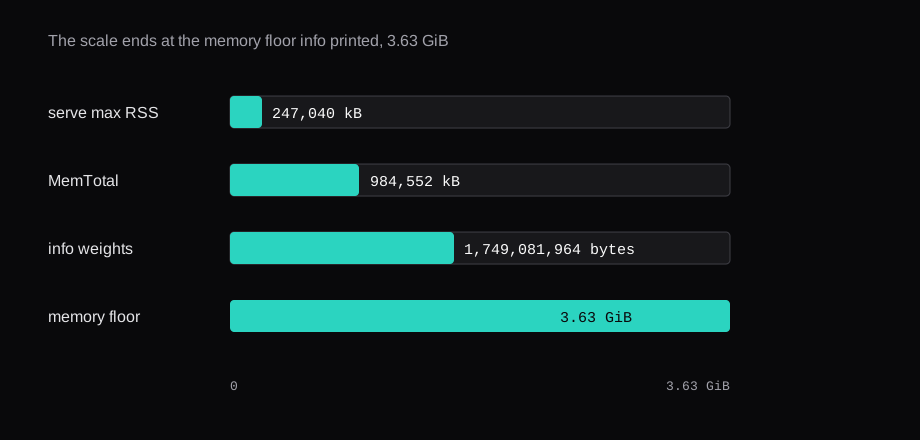
After the copy, df on the guest root showed 35,880,886,272 bytes free. The lab disk is a 40,483,942,400 byte image.
Why does serve say no CUDA driver?
With the cache on the guest I ran the same serve flags. Exit status 1, wall time 0:00.37, maximum resident set size 247,040 kB, 48 major faults, 73,249 minor faults, signals delivered 0. stderr was tensorfold: no CUDA driver (DriverUnavailable). MemAvailable before the command was 707,520 kB. ss -lnt afterwards was the header and no rows.
models exited 0 and printed mlx-community/Qwen3.5-2B-MLX-4bit: Qwen3.5-2B or Qwen3.8-27B (qwen3_5). The checkpoint is visible to the binary, and ss stayed on the header.

--backend mlx on that serve exited 2. After the usage text, the error was:
tensorfold serve: error: --backend mlx is not served by the native engine; the Python engine 0.6.6 serves it: python -m pip install git+https://github.com/ashhart/[email protected]The README says a recipe may describe that older Python 0.6.6 engine, and the Linux quick start is the native archive. I stopped at the error. --help on this binary lists --backend as auto, mlx, or cuda, and the error names Python 0.6.6 as the engine that serves mlx.
The same serve, on the machine that ran pull, printed the same stderr. That machine has no nvidia-smi and no /dev/nvidia*. MemTotal there was 50,149,304 kB, and 50,149,304 / 1024 / 1024 = 47.826 GiB, against info's 3.63 GiB floor. The wall time was 0:00.47, and the maximum resident set size was 247,624 kB.
Where would the completion have gone?
The README flag table says --host and --port default to 127.0.0.1:8080. Its example is a POST to http://127.0.0.1:8080/v1/chat/completions with "model":"local-model". I passed that host, that port, and that name. The process had exited, and ss had no socket. This is the request the README prints:
curl -fsS http://127.0.0.1:8080/v1/chat/completions \
  -H 'Content-Type: application/json' \
  -d '{"model":"local-model","messages":[{"role":"user","content":"Say hello in one sentence."}],"max_tokens":128,"temperature":0}'
AgentGateway on a $5 VPS is where baseUrl: http://127.0.0.1:8080/v1 would go if this serve had stayed up. On that guest the gateway answered model names from local mocks, and the upstream was whatever baseUrl the file named. Here the upstream would have been a closed port. The Compose checklist is the loopback case for a port that is actually listening. Publish 127.0.0.1 once the program is up, because a public bind takes a different packet path.
The v1.2.1 README installs the archive, checks the checksum, and runs pull, then serve. The block sets V=1.2.1. I used that tag's tarball. Its serve line also passes --context 8192. Mine left that flag off and still exited on the driver.
V=1.2.1
case "$(uname -m)" in
  aarch64|arm64) PLATFORM=linux-aarch64 ;;
  x86_64) PLATFORM=linux-x86_64 ;;
  *) echo 'No release archive for this CPU' >&2; exit 1 ;;
esac
curl -fLO "https://github.com/ashhart/TensorFold/releases/download/v$V/tensorfold-$V-$PLATFORM.tar.gz"
curl -fLO "https://github.com/ashhart/TensorFold/releases/download/v$V/tensorfold-$V-$PLATFORM.tar.gz.sha256"
sha256sum -c "tensorfold-$V-$PLATFORM.tar.gz.sha256"
tar -xzf "tensorfold-$V-$PLATFORM.tar.gz"
export PATH="$PWD/tensorfold-$V-$PLATFORM/bin:$PATH"
tensorfold() { command tensorfold-native "$@"; }
tensorfold pull mlx-community/Qwen3.5-2B-MLX-4bit@93760be4f1f69842a46bc13dbdc0f19e291392a3
tensorfold serve mlx-community/Qwen3.5-2B-MLX-4bit --name local-model --context 8192 --no-thinking
The README says the model weights have their own licenses. The engine license on that page is Apache-2.0.
What does the $5 in the title refer to?
RackNerd's specials page lists a 1 GB KVM VPS, 1 vCPU, 20 GB SSD, at $21.99 a year. Divided by 12, that is $1.83 a month. This guest was qemu -m 1024 -smp 1. The kernel reported MemTotal 984,552 kB. The $5 in the title is a ceiling for a box that size. The special is the price I could check. The guest disk was the 40,483,942,400 byte lab image. The special's disk is the 20 GB SSD on that page.
info's floor, 3.63 GiB, is already past that MemTotal. The backends list on this binary is cuda, and the checked machines in the README row for this 2B file are a Mac and a GB10.
Questions people ask about TensorFold on a VPS
Can this binary serve on a CPU VPS?
On this 1.2.1 linux-x86_64 build, capabilities listed cuda. Serve with the checkpoint cached printed no CUDA driver (DriverUnavailable), exit 1, maximum resident set size 247,040 kB. info ran, exit 0, and printed the 3.63 GiB floor at 4,480 kB.
How much memory does the 4-bit 2B ask for?
info printed weights of 1.63 GiB, 1,749,081,964 bytes, and a memory floor of 3.63 GiB, the weights plus a 2.00 GiB runtime margin. The README row says "no RAM minimum published" and names a Mac or a GB10. This guest's MemTotal was 984,552 kB.
Does serve download the model?
The first serve said the native engine does not download, and named tensorfold pull. Maximum resident set size on that exit was 3,840 kB. pull of the pinned revision finished in 88.40 seconds and stored 93760be4f1f69842a46bc13dbdc0f19e291392a3.
What does --backend mlx do here?
Exit 2. The error named the Python engine 0.6.6 and a pip install line. I left that install alone. The native binary's backends list remained cuda.
Did port 8080 stay open?
ss -lnt after the driver error showed the header only. The README default is 127.0.0.1:8080, and the flags I passed used that address.