
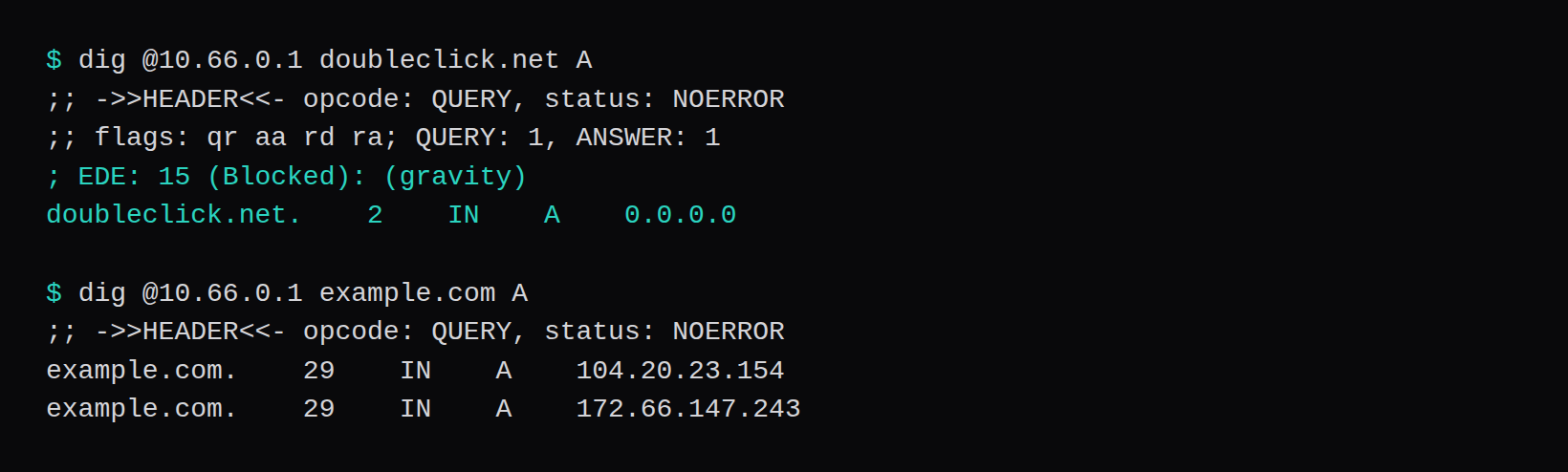
A peer at 10.66.0.2 asked 10.66.0.1 for doubleclick.net and got 0.0.0.0, with EDE: 15 (Blocked): (gravity). The same peer asked for example.com and got two addresses, 104.20.23.154 and 172.66.147.243. The DNS socket on the host was pihole-FTL, bound to 10.66.0.1 and to 127.0.0.1.
The image is pihole/pihole with label 2026.10.1. Inside the container, pihole -v reported Core v6.5, Web v6.6.1, and FTL v6.8. Gravity parsed 77,759 exact domains. gravity.db is 4,587,520 bytes.
The peer is a network namespace on this machine, not a handset. WireGuard is between 10.66.0.1 on the host and 10.66.0.2 in the namespace, over an underlay of 192.0.2.30 and 192.0.2.31. A ping from the namespace to 10.66.0.1 came back. WireGuard on a VPS, with a phone QR is the part where the client is a phone. The peer here can already reach the VPS address.
The interface, then the image
wg-pi has to exist before the container, because BIND opens sockets on a named interface. Keys are the same wg genkey and wg pubkey pair as the Ubuntu WireGuard page. On the host:
ip link add wg-pi type wireguard
ip addr add 10.66.0.1/24 dev wg-pi
wg set wg-pi private-key \
  /etc/wireguard/wg-pi.key
wg set wg-pi peer PEER_PUBLIC_KEY \
  allowed-ips 10.66.0.2/32
ip link set wg-pi up
The namespace holds 10.66.0.2/24 and a peer whose allowed address is 10.66.0.1/32. That allowed list is what the phone profile uses too. The underlay addresses are 192.0.2.30 and 192.0.2.31.
The image is pihole/pihole with label 2026.10.1. The Docker page publishes port 53 on every interface and sets FTLCONF_dns_listeningMode to ALL. This run uses host networking, so FTL can see wg-pi, and the listening mode is BIND. The config reference names that mode FTLCONF_dns_listeningMode and the interface FTLCONF_dns_interface. The same page names the two NTP servers FTLCONF_ntp_ipv4_active and FTLCONF_ntp_ipv6_active. Both were set off. The panel port is the value that landed on 127.0.0.1:8088.
docker run --name pihole \
  --network host \
  -e FTLCONF_dns_listeningMode=BIND \
  -e FTLCONF_dns_interface=wg-pi \
  -e FTLCONF_webserver_port=127.0.0.1:8088 \
  -e FTLCONF_ntp_ipv4_active=false \
  -e FTLCONF_ntp_ipv6_active=false \
  pihole/pihole:2026.10.1
docker run with --network host is the process that stayed. The first attempt, a published 0.0.0.0:53, is the one Docker refused. The versions and the 77,759-domain gravity list are from that container's first start.
Port 53 on the tunnel address
The first Docker publish asked for 0.0.0.0:53. Docker refused it: failed to bind host port 0.0.0.0:53/tcp: address already in use. systemd-resolved was holding 127.0.0.53:53 and 127.0.0.54:53. A wildcard bind overlaps those. With resolved stopped, the same publish came up, and ss showed docker-proxy on 0.0.0.0:53 for both UDP and TCP. That container was removed, and resolved was started again.
The process that stayed uses host networking, so FTL can see the WireGuard interface. The environment was FTLCONF_dns_listeningMode=BIND, FTLCONF_dns_interface=wg-pi, FTLCONF_webserver_port=127.0.0.1:8088, and both NTP listeners off. BIND is the mode that makes FTL open sockets on the named interface. The docs warn that this misbehaves if the interface disappears. wg-pi was up before the container started.
UNCONN  127.0.0.1:53      pihole-FTL
UNCONN  10.66.0.1:53      pihole-FTL
LISTEN  10.66.0.1:53      pihole-FTL
LISTEN  127.0.0.1:53      pihole-FTL
LISTEN  127.0.0.1:8088    pihole-FTL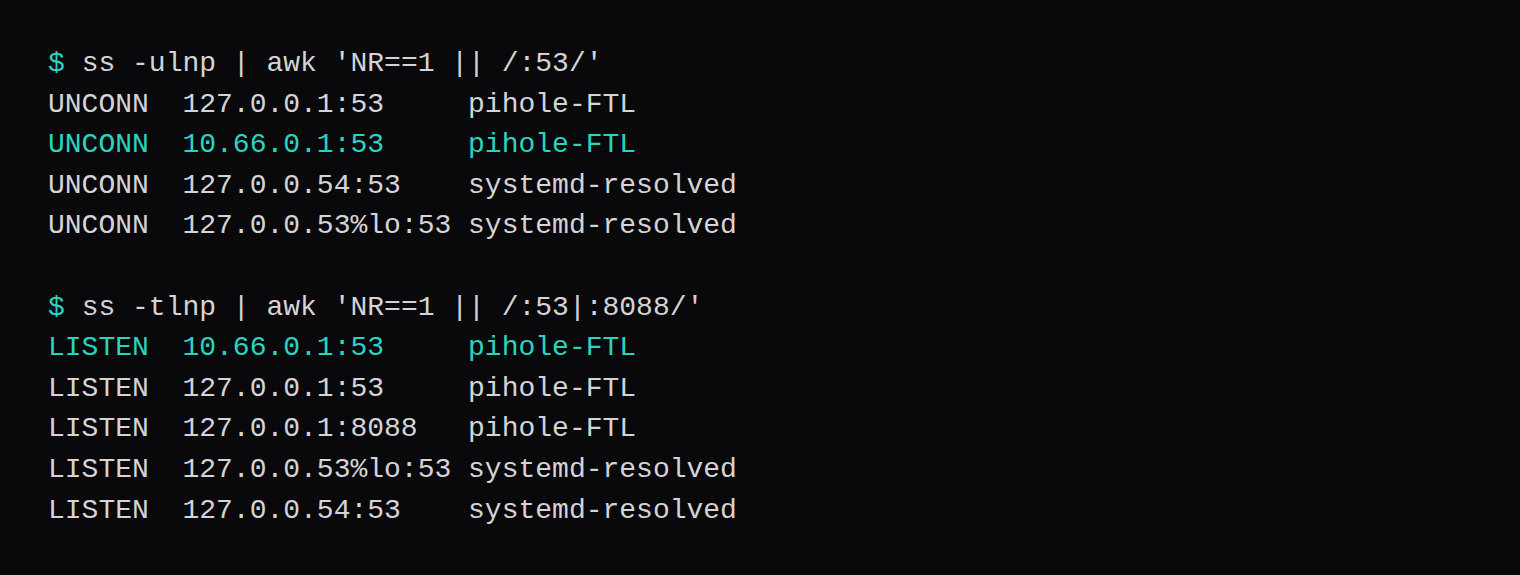
There is no 0.0.0.0:53 in that list. Loopback is there because FTL added it. A query from the public NIC has no socket to land on. NodeRings firewall rules are the place a Proxmox VM would also refuse 53 on the public address, in front of the guest. This lab did not push a ruleset. The socket list is the check that was actually run.
One blocked name, one normal name
From the namespace:
;; ->>HEADER<<- opcode: QUERY, status: NOERROR
;; flags: qr aa rd ra; QUERY: 1, ANSWER: 1
; EDE: 15 (Blocked): (gravity)
doubleclick.net.    2    IN    A    0.0.0.0
example.com came back NOERROR with the two A records above, TTL 29. The blocked answer has TTL 2, and the extended DNS error says gravity blocked it. Status is NOERROR in both cases. The block is the address 0.0.0.0, not a failed lookup.
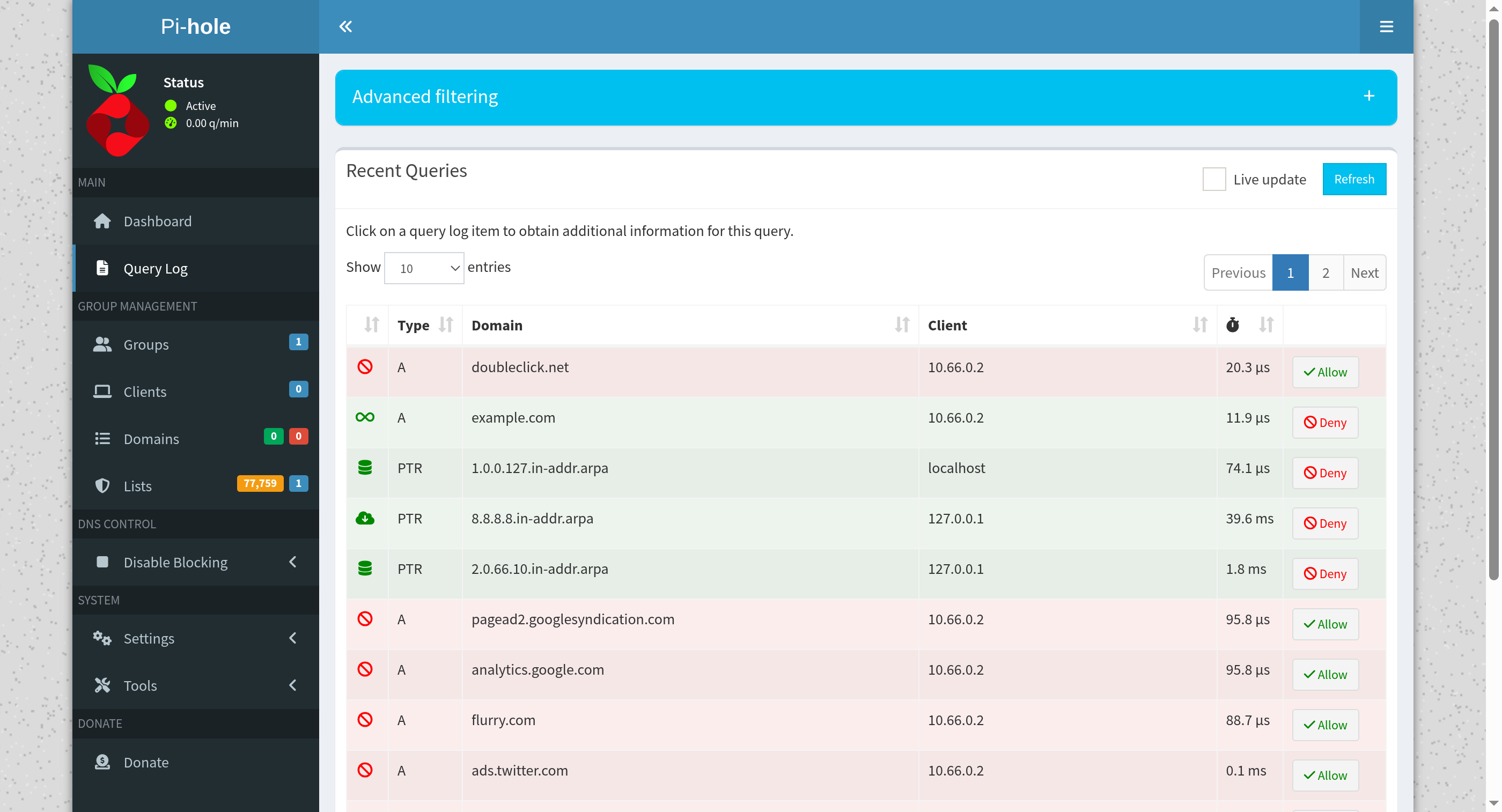
Gravity's log line was one list: 77,759 exact domains, zero ABP-style domains, and one non-domain entry ignored. The panel's Lists badge shows the same 77,759. That is the default list the image built on first start, not a stack of extra blocklists added later.
The query log, from the panel on 127.0.0.1:8088, shows the same two names from client 10.66.0.2. doubleclick.net is the blocked row. example.com is the forwarded one. The log's own reply times on those rows were 20.3 µs and 11.9 µs. The API status for those two was GRAVITY and FORWARDED.
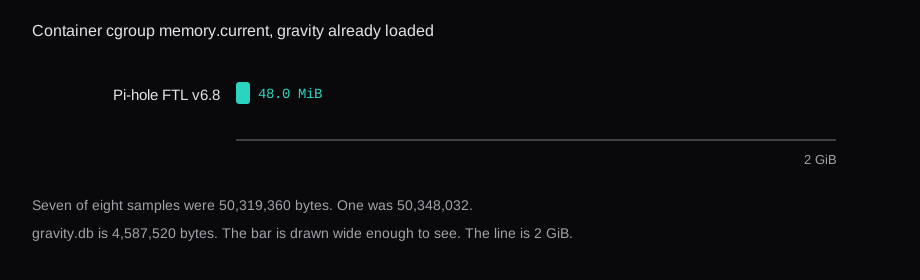
Eight samples of the container's cgroup memory.current, three seconds apart, were 50,319,360 bytes seven times and 50,348,032 once. That is 48.0 MiB, with gravity already loaded. The host was doing other work during the samples. The cgroup number stayed put.
The phone side of the tunnel has allowed ips: 10.66.0.1/32. That is enough for DNS. The namespace sends a query to 10.66.0.1 and the answer comes back the same path. The rest of the phone's traffic stays on the network it is already using. The blocklist applies when the client uses 10.66.0.1 as its resolver. dig @10.66.0.1 is that choice, made one query at a time. On a phone it is the DNS field in the WireGuard profile. A tunnel whose profile leaves DNS blank comes up, and the phone keeps the resolver it already had.
0.0.0.0 with NOERROR is the block this build returns. The lookup succeeded from the client's point of view, and the address is unusable. An application that treats any answer as "this name exists" will see a hit. The EDE line is what tells you gravity made the decision. The query log row is the same fact, with the client address 10.66.0.2 so you can see which peer asked.
There was a middle setup, before host networking. Docker published 10.66.0.1:53 into a bridge container, and ss on the host showed docker-proxy on that address. FTL's own log, inside the container, said it was listening on 0.0.0.0 port 53. The published address was 10.66.0.1, so the public NIC had no socket of its own. Inside the container, FTL was still bound to every interface it could see. Host networking plus BIND on wg-pi removes that split. The host ss and FTL's socket are the same thing, and the name on the socket is pihole-FTL.
What a phone off the tunnel still does
A phone that is not a WireGuard peer uses the resolver of the network it is on. Cellular DNS, the café, the office. This Pi-hole never sees those queries, because nothing routes them to 10.66.0.1. The blocklist applies to clients that send their DNS to that address.
NodeRings DNS is a different service. It is the authoritative DNS for a domain you add at /organization/dns, with records and nameservers ans1.nrings.io and ans2.nrings.io. It does not filter doubleclick.net for a phone.
Does the panel have to be on the public address?
The web port in this run is 127.0.0.1:8088. The query log above was opened from the host, on that address. DNS for the peer is 10.66.0.1:53. Those are two sockets. Putting the panel on the public NIC would be a separate choice, and this run did not make it.
Why did the wildcard bind fail the first time?
systemd-resolved already owned port 53 on loopback. Docker's attempt to publish 0.0.0.0:53 overlaps that, and the daemon returned address already in use. Stopping resolved made the open socket possible, and ss then showed docker-proxy on 0.0.0.0:53. That is the open resolver. It was removed in the same sitting, resolved came back, and the process left running is the one bound to the tunnel address.