Cursor can order a NodeRings VM once you connect the hosted MCP server. Before you click approve on the sign-in page, it helps to know what that token is allowed to touch.
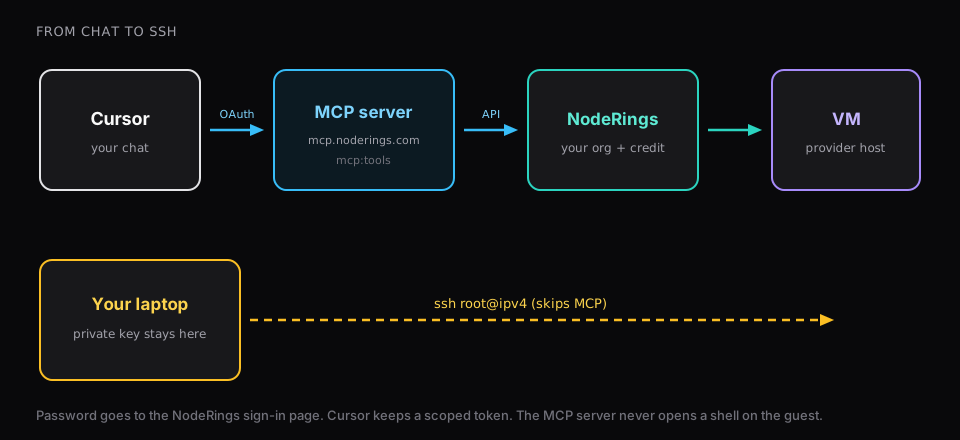
The server sits at https://mcp.noderings.com/mcp. Cursor opens OAuth with client id noderings-mcp and comes back with a token scoped to mcp:tools for one organization. Your password stops at the NodeRings sign-in page. After that, each tool call is an ordinary API request under that org, including the credit check the console already runs.
How to connect and place the first order is covered in Create a VM from Cursor with the NodeRings MCP server. Below is the edge of the session.
What a client session can call
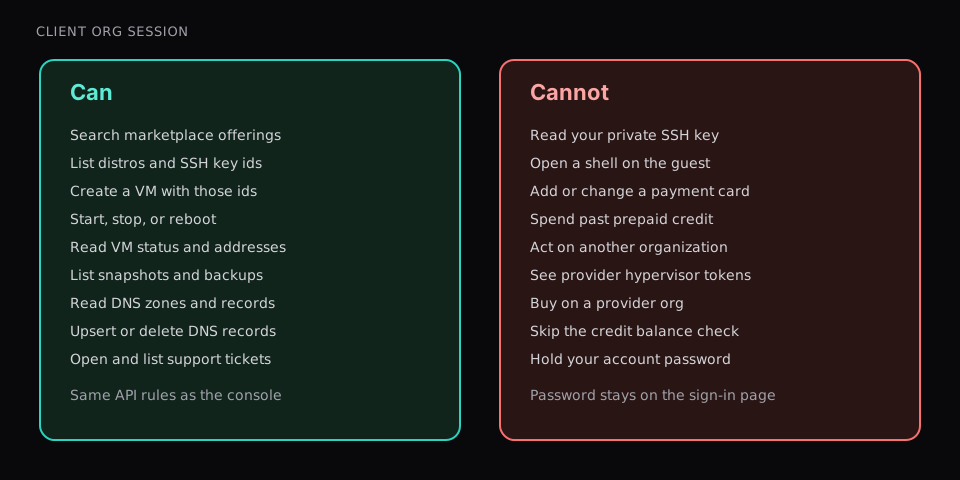
A client organization (the kind that buys plans) gets the tools below. A provider organization gets a different list. It cannot search the marketplace or create a customer VM.
Marketplace and create
list_marketplace_offerings,get_marketplace_planlist_distros,list_ssh_keyscreate_virtual_machine(SSH key ids only)
Power and readback
list_virtual_machines,get_virtual_machine(ipv4andipv6show up here)update_virtual_machine_power(start, stop, reboot)create_snapshot,list_snapshots,list_backupslist_firewall_rulesets,get_firewall_ruleset
DNS and tickets
list_dns_zones,get_dns_zone,list_dns_recordsupsert_dns_record,delete_dns_recordlist_tickets,get_ticket,create_ticket
Identity
get_identity,list_organizations,get_organizationlist_plans(billing tiers; the create call still needs a marketplaceplan_idfromlist_marketplace_offerings)
If a tool name moves, treat the MCP guide as the contract.
What the token does not cover
There is no MCP tool that opens a shell on the guest. You connect with SSH from your own machine. Create asks for SSH key ids because the guest needs a public key installed; the private half can stay where you generated it.
list_ssh_keys returns id, name, type, and fingerprint. It does not return key material.
Payment methods and credit purchases stay in the console. If the balance is too low, create fails with Insufficient prepaid credits and names the minimum. The assistant has no top-up tool. In practice the floor on a failed create is about $10 available; the Cursor walkthrough puts about $15 on the account so the first hours clear that check.
The token belongs to the organization you picked at approve time. Change organization in the console, then sign in from Cursor again.
Connect with a provider org and the marketplace create tools simply are not registered. Buy from a client org that already holds the credit and the key.
Refresh uses the refresh token. Cursor does not need your password again until you revoke access or refresh fails.
Why SSH stays off MCP
A common request is to let the agent SSH in and finish the install. That puts the agent on the guest with whatever access you gave that key. Fine for some workflows. It is a separate decision from marketplace OAuth.
The NodeRings MCP path ends at the control plane: find a plan, create the VM, change power, read the address, touch DNS and tickets. Configuration on the guest is your SSH session, under whatever risk model you accept there. The org token does not need a shell for that.
What still belongs in the console
Some account work has no MCP tool yet. Removing a VM, changing billing, uploading a new SSH key, and switching which organization you buy under are console actions today. Cursor can still list machines that exist and start, stop, or reboot one it created.
Prefer clicks for the whole order? Create virtual machine in the console calls the same API. MCP is another client on that API, not a second set of rules.
For the first chat-driven order, use the Cursor walkthrough. Come back here when you want the tool list and the hard edges before you approve the next sign-in.