
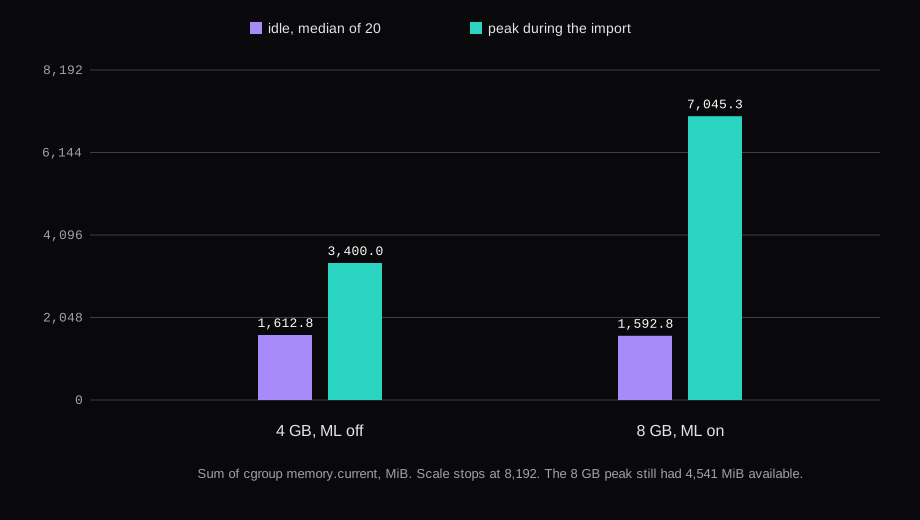
Immich 3.3.5 on an 8 GB guest, 4 vCPU, idled at 1,592.8 MiB and cleared its face queue 11 minutes 38 seconds after the upload started. The 1,440 px previews of 1,000 generated JPEGs were 2.15 GiB, 76% of the originals, because the files are random noise and do not compress. A 4 GB guest with machine learning switched off idled at 1,612.8 MiB, finished thumbnails in 6 minutes 29 seconds, and never queued face detection, smart search, or OCR. The same 4 GB guest, with machine learning back on, stayed up through the same 1,010 files. Its face queue was empty at about 17.5 minutes, and MemAvailable bottomed at 560.5 MiB. dmesg recorded no out-of-memory kill on any of the runs.
| 4 GB, ML off | 8 GB, ML on | 4 GB, ML on | |
|---|---|---|---|
| qemu | -m 4096 -smp 2 | -m 8192 -smp 4 | -m 4096 -smp 2 |
MemTotal | 3,915.9 MiB | 7,941.2 MiB | 3,915.9 MiB |
| Idle, 20 samples | 1,612.8 MiB | 1,592.8 MiB | not taken |
Peak memory.current | 3,400.0 MiB | 7,045.3 MiB | 3,430.5 MiB |
Lowest MemAvailable | 1,349.6 MiB | 4,243.5 MiB | 560.5 MiB |
| Upload of 1,010 files | 83.6 s | 102.8 s | 159.5 s |
| Thumbnails empty | 6 min 29 s | 9 min 38 s | 14.0 min |
| Smart search empty | no jobs | 9 min 38 s | 15.5 min |
| Face queue empty | no jobs | 11 min 38 s | 17.5 min |
| OCR empty | no jobs | 13 min 37 s | 20.0 min |
OOM kills in dmesg | 0 | 0 | 0 |
The guests were Ubuntu 24.04, KVM, -cpu host, swap off. The 8 GB boot came first. I then booted the same disk at 4 GB and 2 vCPU, measured machine learning off, wiped the library and Postgres, and brought the same compose file back with machine learning on. Two launches, three configurations. The image was ghcr.io/immich-app/immich-server:v3.3.5 at sha256:485d546a2e31d6a8b4db8423fcba5c109de8c218d93410af115fd1ccfc4352a6, and the machine-learning image was the same tag at sha256:5b28c9352c8374b8a1ed96fbdd8d6755fea6e43510ec43fdf6538aa02ea40f56. CPU-only is that default tag. The hardware-acceleration block in the compose file stays commented out.
IMMICH_VERSION=v3.3.5The release note on that tag is a certifi update after a CA compromise, plus Node.js security patches. It asks people to update. The pin is v3.3.5.
How much RAM does Immich need?
The requirements page says 6 GB minimum and 8 GB recommended, and 2 CPU cores minimum, 4 recommended. For a smooth upload it wants at least 6 GB. On 4 GB it says Immich can run with machine learning disabled. Since v3, the machine-learning container on amd64 wants x86-64-v2. Postgres files are typically 1 to 3 GB, and DB_DATA_LOCATION should be local SSD, never a network share. If you set a Docker memory limit, Postgres wants at least 2 GB of that. I set no Docker limits. The compose file gives Postgres shm_size: 128mb. A full VM is the supported virtualization. LXC is not recommended.
Idle, on the 8 GB guest, was one GET of /api/server/ping (it returns {"res":"pong"}), 10 minutes quiet, then 20 samples 30 seconds apart. The sum is cgroup memory.current for every running container. Where docker stats disagrees, the sentence says so. smem's PSS for the whole guest, including dockerd, sat around 1.6 GB.
The four containers, median memory.current: the server 689.5 MiB, Postgres 696.4, machine learning 202.5, Valkey 4.5. docker stats agreed on the server and on machine learning, and printed Postgres at 375.4 MiB. The cgroup is higher because it charges the container's page cache. The table uses the cgroup. MemAvailable median was 6,055.6 MiB against a MemTotal of 7,941.2 MiB. The model-cache volume was 0 bytes. The log said the in-memory model cache unloads after 300 seconds of inactivity, and no model had been downloaded yet. The idle number does not include buffalo_l, CLIP, or OCR.
The first job downloaded them. The log named buffalo_l for faces, ViT-B-32__openai for the CLIP visual model, and PP-OCRv5_mobile for OCR (a 4.60 MB detection file and a 15.86 MB recognition file). After the import the volume was 1.67 GiB: CLIP 1.21 GiB, facial recognition 415 MiB, OCR 51 MiB.
During the import the cgroup sum peaked at 7,045.3 MiB. At that sample docker stats printed the server at 3.889 GiB and 179% CPU, machine learning at 1.143 GiB and 215% CPU, Postgres at 389 MiB, Valkey at 10 MiB. MemAvailable at that same sample was 4,540.8 MiB. The lowest available reading in the 30 samples was 4,243.5 MiB. The tall bar is the library sitting in the server's page cache. Sample 29, after the queues were idle, still had the server cgroup at 5,417 MiB.
What does 4 GB do with machine learning off?
Same compose file. I set machineLearning.enabled to false in the system config and stopped immich_machine_learning. restart: always did not bring it back. The idle window and the import both ran with three containers.
Idle median was 1,612.8 MiB: server 808.6, Postgres 781.7, Valkey 22.6. docker stats printed 717.7, 444.5, and 20.4. MemAvailable median was 2,362.1 MiB, MemTotal 3,915.9 MiB. Stopping the machine-learning container removed the 202 MiB it had used on the 8 GB boot. The other three containers were higher on this boot than on that one, so the sums are not a subtraction. Different boots, different page cache.
The upload of the same 1,010 files took 83.6 seconds. Thumbnail generation was the only queue that held work. Face detection, smart search, OCR, and video conversion stayed at zero for all 16 samples. The thumbnail queue first read zero at 6 minutes 29 seconds. The cgroup sum peaked at 3,400.0 MiB, with the server at 196% CPU and 2,487 MiB in docker stats. MemAvailable never fell below 1,349.6 MiB.
The preview and thumbnail files came out the same size as on the 8 GB guest, byte for byte.
How long does CPU-only machine learning take?
The corpus was 1,000 ImageMagick JPEGs, 2270 by 1700, quality 88, random noise. Median file 3,000,298 bytes, sum 3,000,237,560. Plus 10 H.264 clips, 1280 by 720, 10.0 seconds each, sum 37,664,814 bytes. Originals together, 3,037,902,374 bytes. No personal photos. I did not change the job concurrency the server shipped with: thumbnails 3, face detection 2, smart search 2, OCR 1, video conversion 1.
On the 8 GB guest the upload returned in 102.8 seconds. Thirty samples, 30 seconds apart. The first sample that read an empty thumbnail queue and an empty smart-search queue was 9 minutes 38 seconds from the start of the upload. The face queue was empty at 11 minutes 38 seconds. OCR was empty at 13 minutes 37 seconds. The model download sat in the first minute of that clock. Facial recognition, the clustering queue, never held a job.
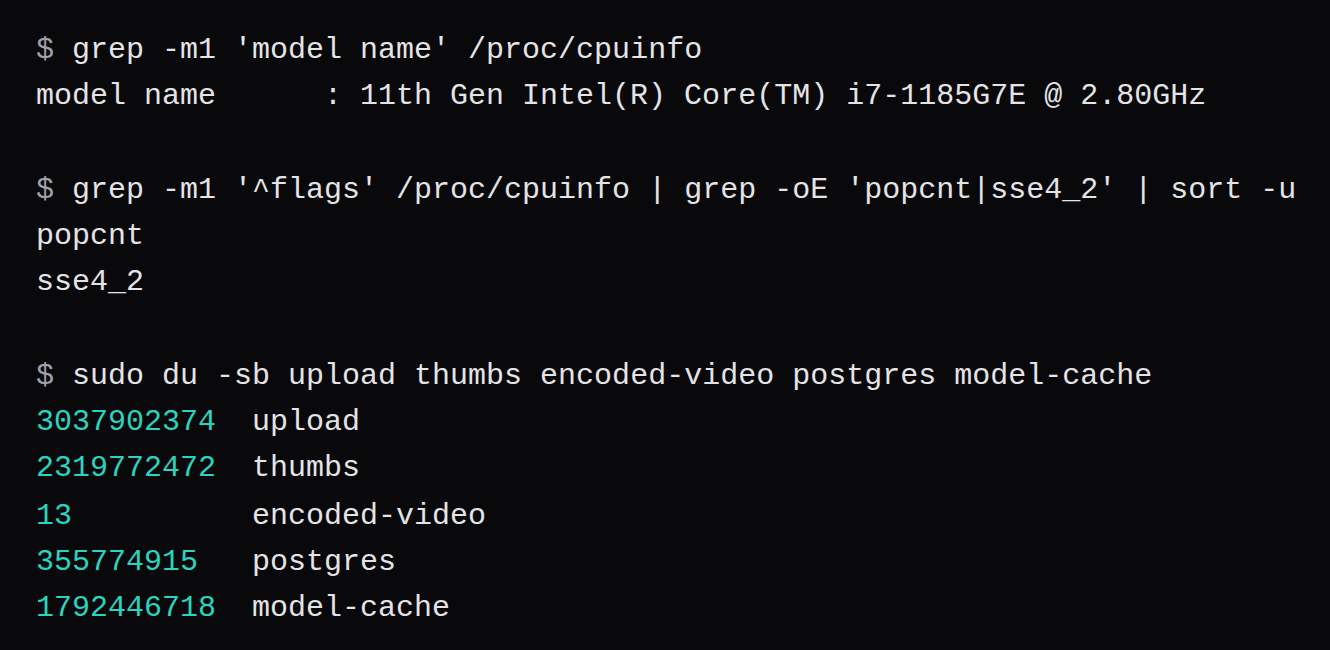
asset_face had 0 rows. person had 0. The config's minFaces is 3, and there was nothing to cluster: the detector stored no faces in this noise. Smart search had 1,010 rows, one embedding per asset, including the clips. OCR had 6 rows. The people table stayed empty.
The video conversion queue never held a job, on this guest or the others. The clips are already H.264 at the target height in the untouched ffmpeg config (targetResolution 720, targetVideoCodec h264, transcode set to required). encoded-video contained a 13-byte .immich marker and no transcodes.
Michael Stapelberg built a VM named photos with 500 GB of disk, 4 cores, and 4 GB of RAM, and wrote that for the initial import you could assign more CPU and RAM, and that for normal use that size was enough. He did not say whether machine learning was off. The 8 GB guest here is the larger shape he pointed at for the import. The 4 GB guest with machine learning on is the closer match to the VM he kept.
That 4 GB run used the model volume the 8 GB job had already filled, so it did not pay the download. Upload took 159.5 seconds, with the two cores shared between thumbnails and the models. Forty-three samples. Thumbnails first read empty at 14.0 minutes, smart search at 15.5, the face queue at 17.5, OCR at 20.0. The cgroup sum peaked at 3,430.5 MiB. MemAvailable fell to 560.5 MiB and stayed in that neighborhood while the queues were busy. The out-of-memory counter stayed 0, and no queue reported a failed job. asset_face was 0 again, person was 0, OCR was 6 rows, and smart_search had 1,009 rows for 1,010 assets.
The requirements page reserves 4 GB for machine learning off, and 6 GB for a smooth upload. I did not boot a 6 GB guest. What this 4 GB guest did, with the features left on, was finish. The upload was the slow one, and half a gigabyte of available memory is a thin floor.
How much disk do 1,000 photos add?
du -sb on the 8 GB guest, after the queues were idle and before a later reboot test:
| Path | Bytes | GiB |
|---|---|---|
Originals, upload | 3,037,902,374 | 2.83 |
| Previews, 1,440 px JPEG | 2,304,661,538 | 2.15 |
| Thumbnails, 250 px WebP | 15,110,934 | 0.014 |
encoded-video | 13 | 0 |
| Model cache | 1,792,446,718 | 1.67 |
| Postgres | 355,774,915 | 0.33 |
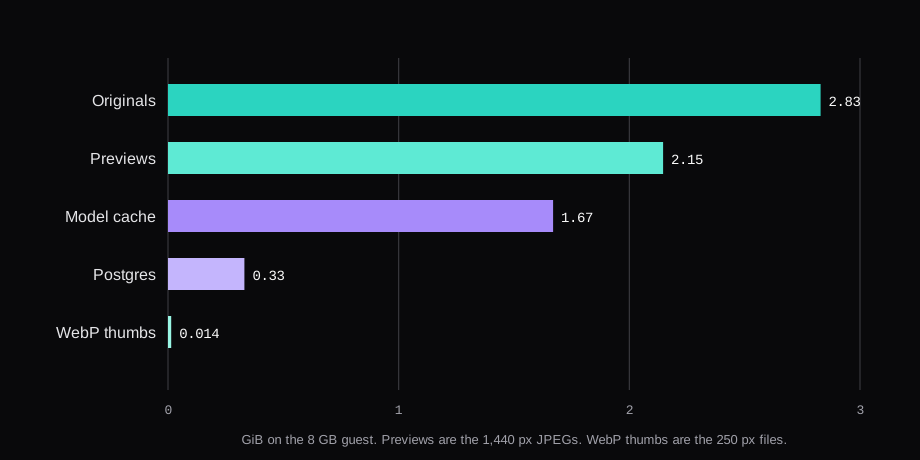
The requirements page says thumbnails and transcoded video can grow a library by 10 to 20 percent on average. Here the WebP thumbnails were 0.5% of the originals, and there were no transcodes. The 1,440 px previews, JPEG quality 80, were 75.9%. Together the thumbs directory was 76.4% of the originals. That is this corpus. Random noise does not compress, and a preview of it is almost another original. A library of real photographs at the same pixel size should land closer to the 10 to 20 percent line. I would not budget 76% for a family archive on the back of these files.
Postgres grew by 10,272,768 bytes, from 345,502,147 to 355,774,915. The 1 to 3 GB line on the requirements page is a lived-in database. This one held 1,010 assets and was still 339 MiB.
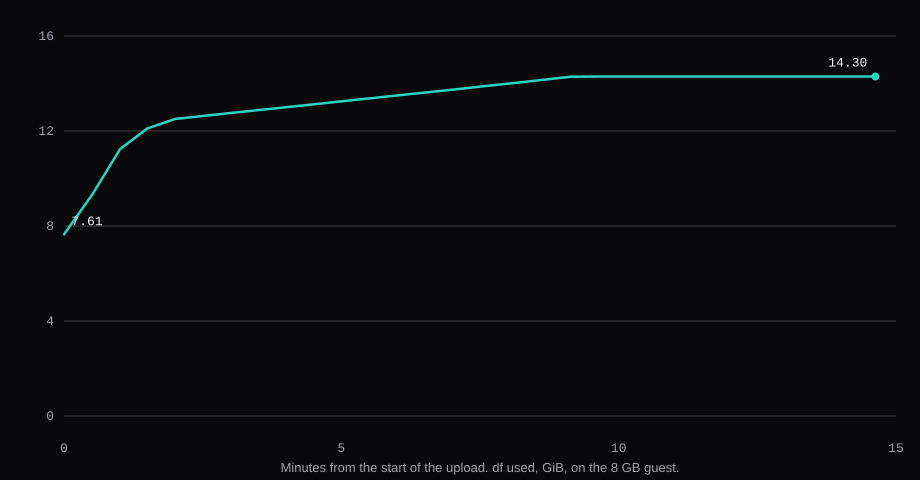
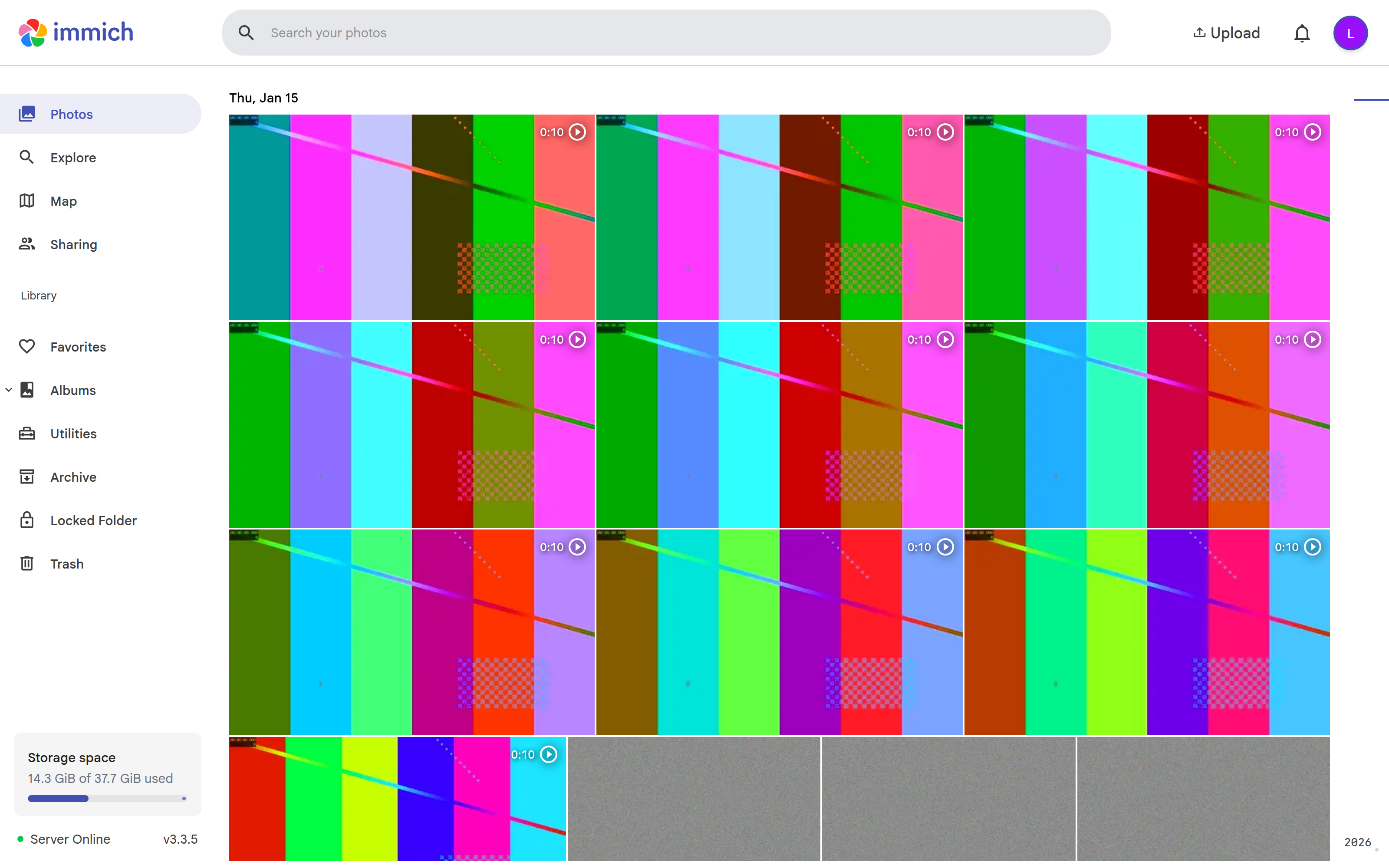
The photos screen, after import, reported 14.3 GiB of 37.7 GiB. That matches df on the guest, 14.30 GiB used of the 40 GB disk. It is the whole guest, not the library folder.
What does Immich add to the monthly bill?
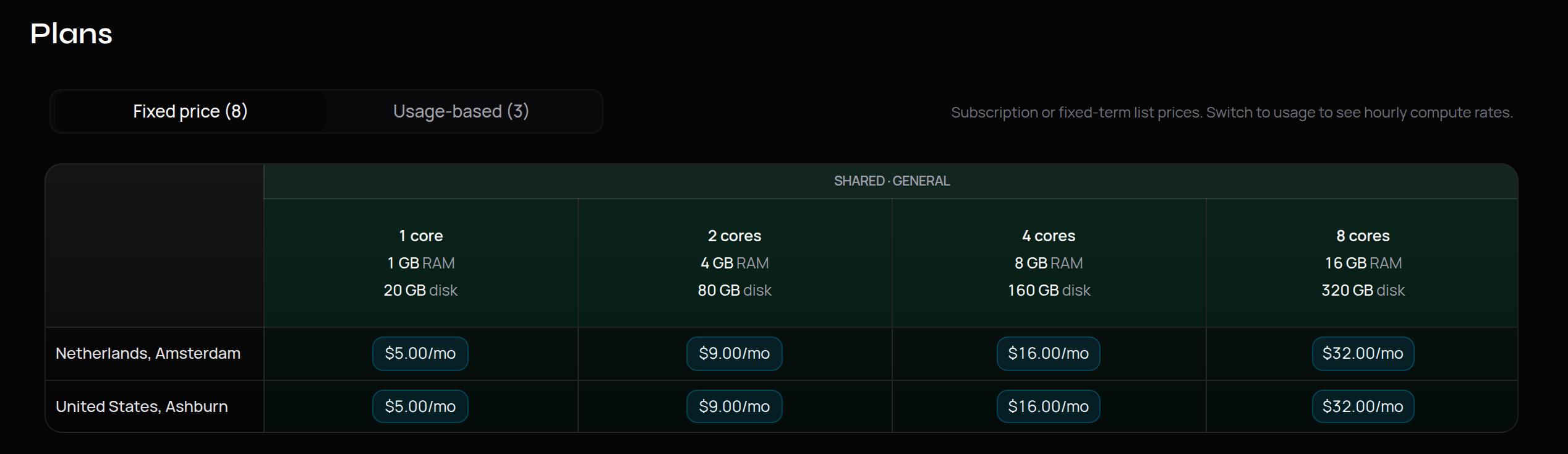
The plan price is whatever that provider lists that week. Search on the home page takes a description of CPU, memory, region, or budget. The marketplace docs describe filtering by region, specs, price, and billing type.
Virtualized's Phoenix list, from the same marketplace, was $12.49 a month for 2 cores, 4 GB, and 40 GB of disk, and $22.99 for 4 cores, 8 GB, and 80 GB. I am using those two catalogs because both were on the page with the price visible.
| 2 vCPU, 4 GB | 4 vCPU, 8 GB | |
|---|---|---|
| Enzonix, Amsterdam and Ashburn | $9.00, 80 GB disk | $16.00, 160 GB disk |
| Virtualized, Phoenix | $12.49, 40 GB disk | $22.99, 80 GB disk |
| Hetzner BX11, the off-box copy | €3.20 | €3.20 |
The library folder was 5.0 GiB and the model cache another 1.67 GiB. That fits the 40 GB disk on the cheaper Virtualized row, and it fits the 80 GB Enzonix row with room. A real library keeps growing after the first thousand photos. The 1 TB box is the copy, not a claim that this test filled a disk.
BX11 is €3.20 a month excluding VAT, €0.0051 an hour excluding VAT, 1 TB, unlimited traffic, 10 snapshots, in FSN1 and HEL1. Postgres stayed on the VM disk, which is what the requirements page asks for. I did not find a NodeRings block-storage product to add a second line for. On the virtual machine page, Volumes is a read-only view of attached storage. Graphs are CPU, memory, and network. Backups and snapshots appear when the hypervisor is Proxmox. The Enzonix catalog also lists a daily VM backup add-on at 10% of the VM price. That is a snapshot of the VM. The library copy in the table is the storage box.
The shape we measured is the plan plus €3.20. Nine dollars plus €3.20 on the small Enzonix plan, sixteen dollars plus €3.20 on the larger one. Dollars and euros stay in their own columns.
Dedicated CPU plans pin physical cores (DC-*) and use the same purchase flow as shared compute. They do not list a microarchitecture filter. Neither does the search box. I looked for a CPU model list, including an older Xeon, and the results were plans by core count, RAM, and disk.
grep -m1 '^flags' /proc/cpuinfo | grep -oE 'popcnt|sse4_2'This host's flags included popcnt and sse4_2, and -cpu host passed them into the guest. The v3 refusal on x86-64-v1 was not reproduced. The last release that still runs on x86-64-v1 is v2.7.5. The requirements page says that release is unsupported, and the server version has to match the machine-learning version. On an older CPU, that grep is the check to run before you pull v3.
A photo library's bill is the disk and a CPU batch while the queues drain. File sync on a small VPS is a different measurement, which is the Nextcloud piece.
What if Safe Browsing flags your domain?
Immich wrote this up after *.immich.cloud was marked dangerous. Chrome and Firefox, through Safe Browsing, showed a red warning. The way past it was Details, then a small "visit this safe site" link. Search Console was the review path, and it required a Google account. Google's text said the pages tried to trick users into something dangerous. The flagged URLs were preview environments, including login pages. One flagged subdomain took the whole domain with it. A review cleared the domain, and the next preview flagged it again. They planned to move previews to immich.build. The same note names Jellyfin, YunoHost, n8n, Nextcloud, and other Immich installs.
On a VPS the name is yours. Serve it over HTTPS. If a flag appears, the review lives in Search Console. Their writeup is here.
FAQ
Can I turn machine learning off later?
The switch I used was machineLearning.enabled set to false, and then docker stop on immich_machine_learning. I did both before the idle window, on a fresh database. After that, face detection, smart search, and OCR never held a job, and thumbnails still ran. I did not flip the switch on a library that already had embeddings, so I can't say what happens to rows that are already stored.
What did a reboot mid-job do?
After the timed import I uploaded 40 more noise JPEGs. At the reboot, thumbnail generation still had 28 jobs, metadata 1, face detection 7, smart search 4, and OCR 8. /api/server/ping answered 21.3 seconds after the reboot command. The first poll still showed work in those queues, thumbnail generation at 26 among them, so the jobs had not been dropped. They read empty 56.6 seconds after the reboot. The photo count was 1,040. restart: always brought every service back.
Will an older VPS CPU run v3?
Run the popcnt and sse4_2 check. If both are missing, v3's machine-learning image is the wrong pin, and v2.7.5 is the last release the docs still name for that CPU. It is unsupported. Marketplace results are core count, RAM, disk, region, and price.