
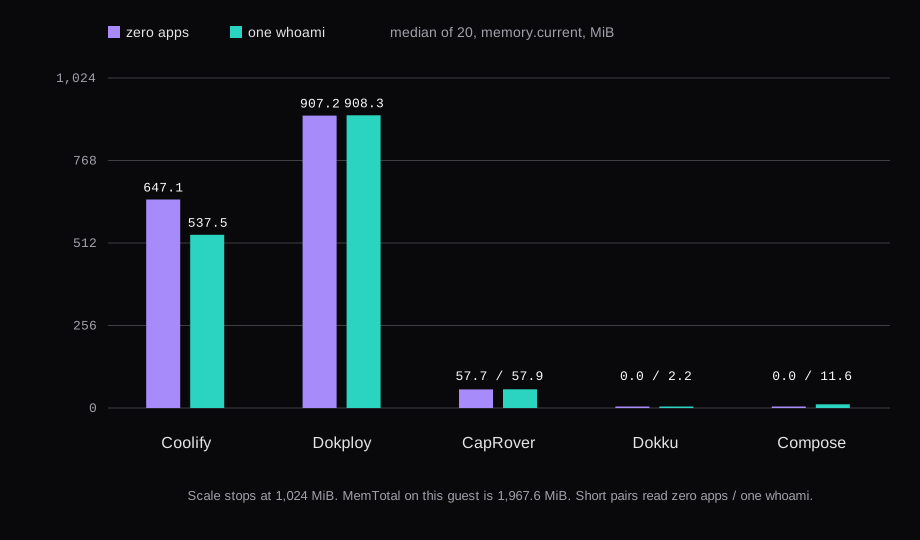
Dokploy 0.30.10 idled at 908.3 MiB with one whoami app on a 2 GB guest. Coolify 4.5.3 sat at 537.5 MiB in its window with whoami, CapRover 1.15.5 at 57.9 MiB, and plain Compose with Caddy at 11.6 MiB. Dokku 0.38.34's only container was the app itself, 2.2 MiB, because its nginx runs on the host. Every one of them answered a local HTTPS request again after a reboot, with nobody typing. The guest was Ubuntu 24.04, qemu -m 2048 -smp 2, a 40 GB disk, swap off, and a fresh overlay for each product. MemTotal read 2,014,852 kB, which is 1,967.6 MiB.
| Coolify 4.5.3 | Dokploy 0.30.10 | CapRover 1.15.5 | Dokku 0.38.34 | Compose | |
|---|---|---|---|---|---|
| Doc minimum | 2 CPU, 2 GB, 10 GB | 2 GB RAM, 30 GB disk | 1 GB, and 512 MB can fail a build | 1 GB for the Docker scheduler | none |
| Idle, zero apps | 647.1 MiB | 907.2 MiB | 57.7 MiB | 0 | 0 |
| Idle, one whoami | 537.5 MiB | 908.3 MiB | 57.9 MiB | 2.2 MiB | 11.6 MiB |
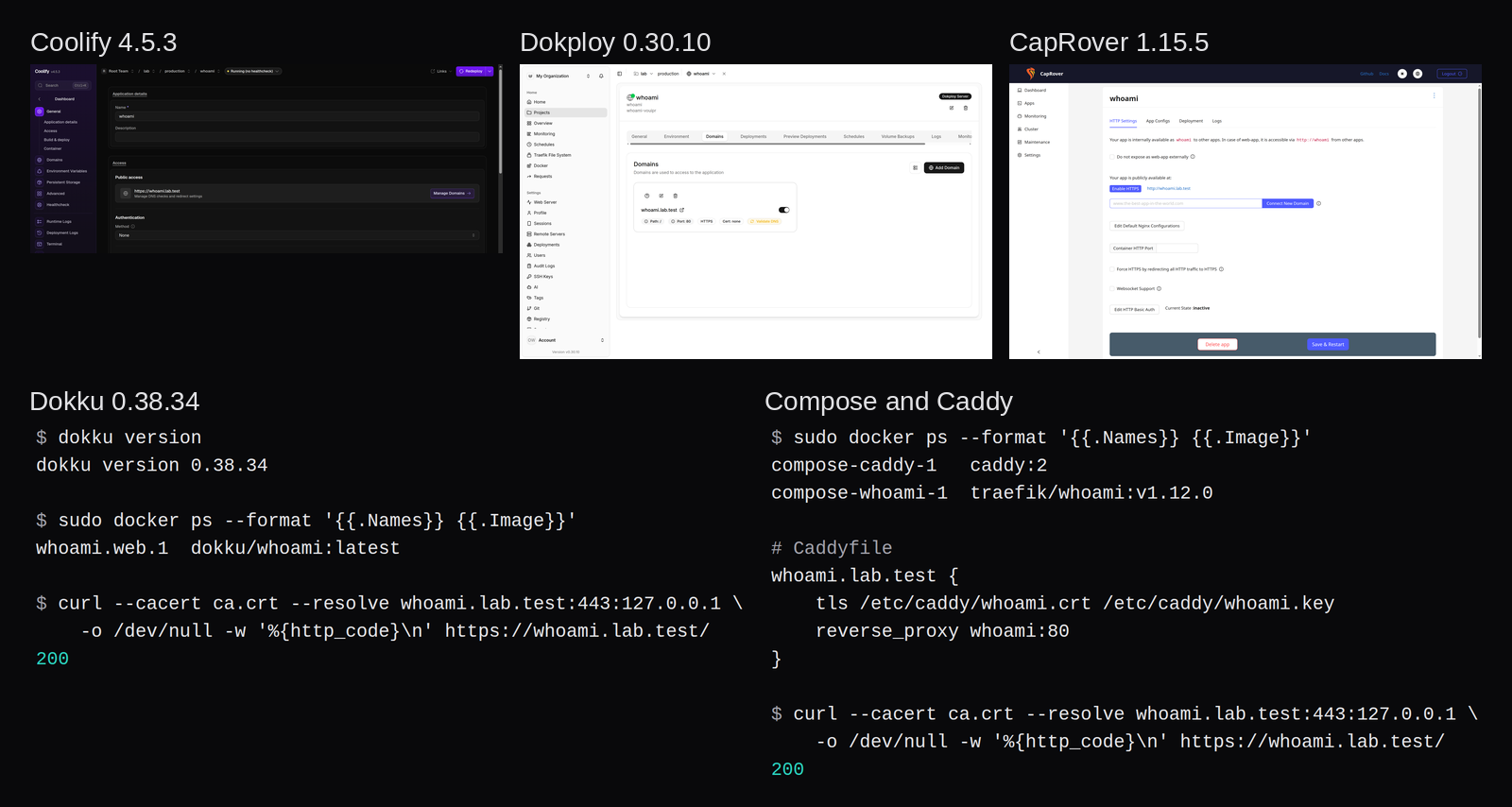
| To a local HTTPS 200 | installer 192s, deploy record 9s | installer 214s, then 94s | Docker 21s, then about a minute to login, then 26s | bootstrap 123s, then 93s | Docker 22s, then 9s |
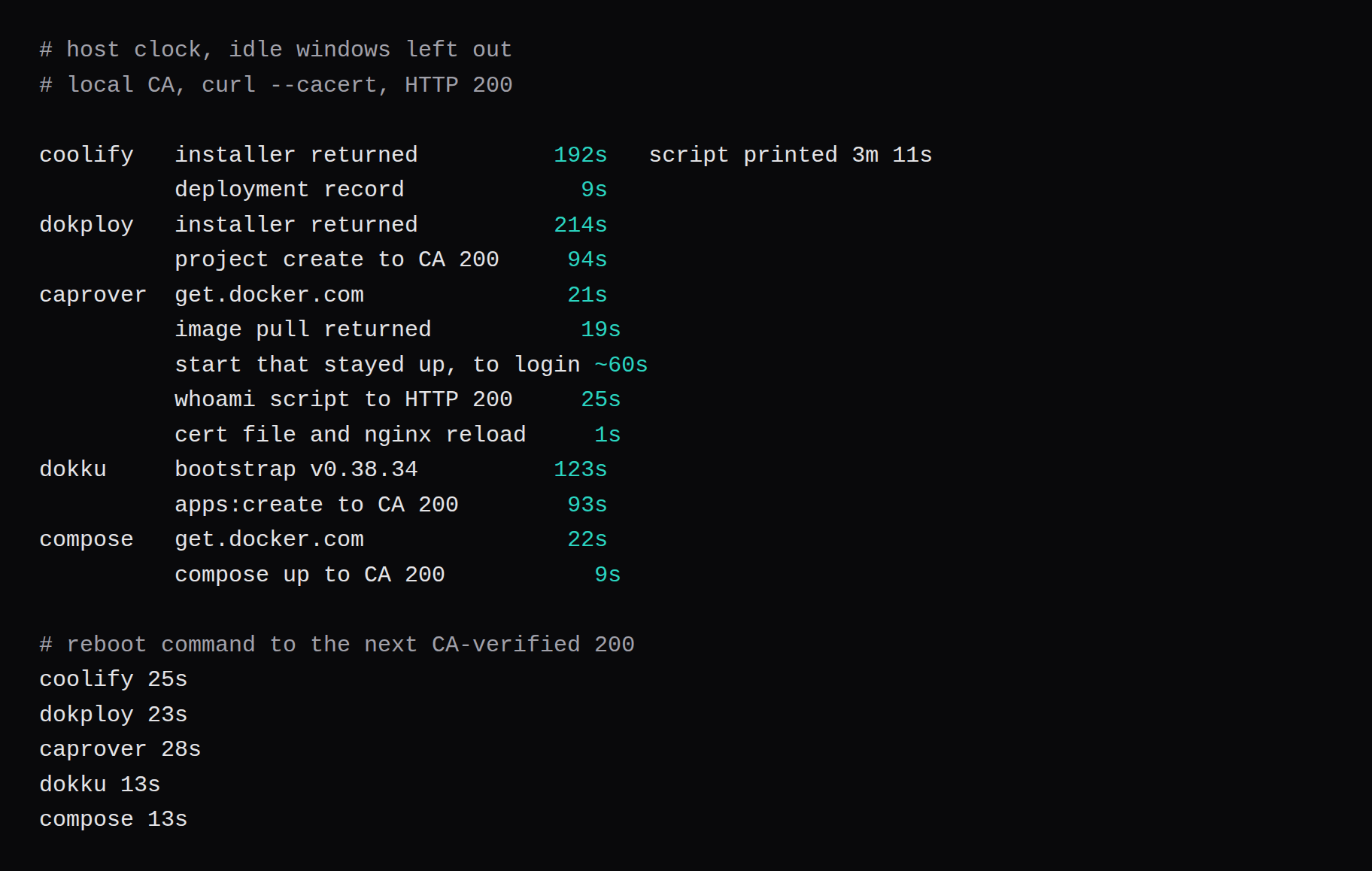
| Up after reboot | 25s | 23s | 28s | 13s | 13s |
| Proxy | Traefik v3.7 | Traefik v3.6.25 | nginx 1.31 | nginx on the host | Caddy 2.11.7 |
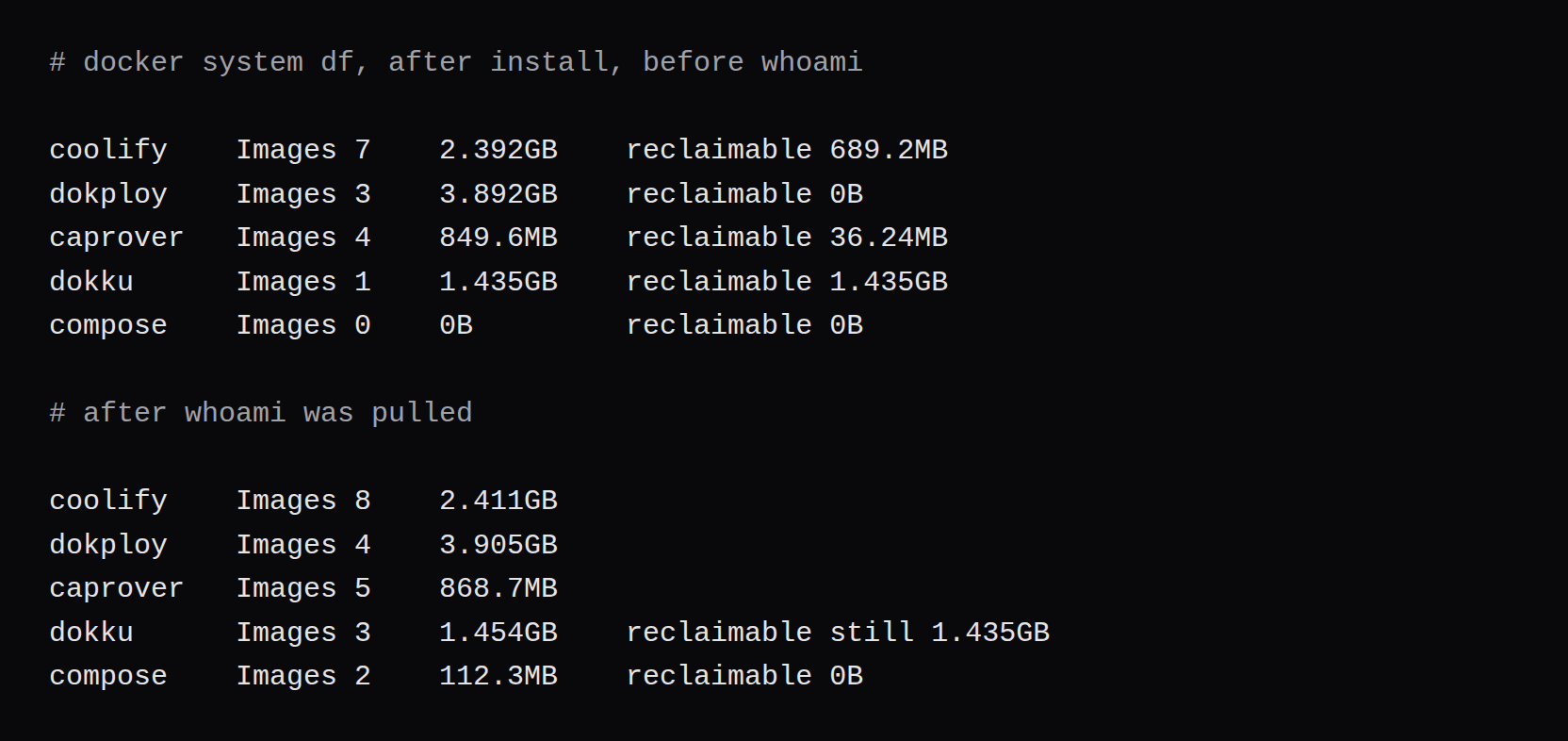
docker system df after install | 2.392GB | 3.892GB | 849.6MB | 1.435GB | 0B |
| License | Apache-2.0 | Apache-2.0, plus DSAL on /proprietary | Apache-2.0 | MIT | the Compose file |
The app was traefik/whoami:v1.12.0 everywhere, digest sha256:c4717a8d1f0134a7444e24f881160e033991f23027c6c5a9a3f8fd22e70d1d44. The certificate was a local CA for whoami.lab.test. This guest sits behind NAT. The certificate in the table is the local CA. DNS from the panel is how a hostname on a real VPS gets to the box.
How much RAM does Coolify use on 2 GB?
Coolify's current install page asks for 2 CPU, 2 GB of RAM, and 10 GB of disk, on amd64 or arm64. It mentions a smaller machine, 1 CPU, 512 MB, and 4 GB of disk, and the recommended line is the 2 GB one. I used that.
The installer was the script from cdn.coollabs.io, with the tag as the first argument.
bash install.sh 4.5.3The script printed "Installed in 3m 11s". The host clock from the SSH command to the script exiting was 192 seconds. Docker came in with that script, version 29.9.2. The running set was Coolify 4.5.3, helper 1.0.19, sentinel 1.1.3, Postgres 15, Redis 7, and Traefik tagged v3.7. docker info said Swarm=inactive.
Zero apps, before whoami, the six containers summed to 647.1 MiB median, between 640.4 and 666.6. The coolify container was 504.6 of that, the database 110.6, the proxy 19.2, sentinel 6.4, Redis 6.1, and the error-pages container 0.3. MemAvailable median was 1,052,506 kB. The out-of-memory counter in dmesg was 0. Where a container is listed on its own, that figure is its median, and the parts can miss the sum by a fraction of a MiB.
whoami's deployment record lasted 9 seconds. The router Traefik wrote pointed at the Let's Encrypt resolver, so the first answer was Traefik's default certificate. I added a file under /data/coolify/proxy/dynamic with the lab CA, and curl --cacert returned 200. The 192 seconds and the 9 seconds stay as two clocks. Reading that default certificate, before the lab file existed, is untimed.
Between the zero-app window and the whoami window I recreated the coolify container so it would reload its env file. The with-whoami sum is 537.5 MiB, between 530.4 and 547.3. whoami itself was 1.9 MiB. The coolify container in that second window was 399.1 MiB, down from 504.6, because it was a new process. whoami's 1.9 MiB is too small to explain a drop of 105 MiB. smem's PSS total for the whole guest had a median of 969.7 MiB across those 20 rounds, and that includes dockerd and every other process. The table's column is the container sum. The same split showed up on n8n's 1 GB guest, where memory.current and the process RSS count different pages.
The 689.2MB docker system df marked reclaimable was the helper image from a temporary container the installer left exited.
How much RAM does Dokploy 0.30.10 use?
Dokploy's install page asks for at least 2 GB of RAM and 30 GB of disk, and it wants ports 80, 443, and 3000 free. The tag on the box was v0.30.10. I used the release asset so the pin stayed there. The unversioned install URL tracks latest.
curl -sL https://github.com/Dokploy/dokploy/releases/download/v0.30.10/install.sh | shThe script returned in 214 seconds. It pinned Docker 28.5.0, ran docker swarm init, and started three containers: dokploy/dokploy:v0.30.10, postgres:16, and traefik:v3.6.25. postgres --version inside that container was PostgreSQL 16.15. Swarm was active. The UI was already answering a 307 to /register on the first check after the script returned.
Zero apps, the three containers summed to 907.2 MiB median, between 850.3 and 970.2. The dokploy container's own median was 840.5, Postgres 51.2, Traefik 16.3. With whoami, on the same dokploy process, the sum was 908.3 MiB, between 907.1 and 909.5. whoami was 1.9 MiB. The panel container was 841.7. MemAvailable median in that window was 708,586 kB, 692.0 MiB, against a MemTotal of 1,967.6 MiB. The out-of-memory counter in dmesg was 0.
smem's last sample had the node process at 771.5 MB PSS. docker stats in that same sample printed 759.6 MiB for the dokploy container, and the cgroup median was 841.7 MiB. The cgroup is higher because it charges the container's page cache. The table uses the cgroup, the same way the other columns do.
A bex roundup calls Dokploy "the tool most likely to be recommended at you by someone who tried Coolify and wanted something leaner," and says its "footprint and Compose fidelity are genuinely better." On this guest, with these two tags, Dokploy's container sum was 908.3 MiB and Coolify's was 537.5. Their version table lists Coolify v4.0 and Dokploy v0.29.x. The pins in this section are the ones that ran.
The same piece says Dokploy's worst CVE wave landed in May and June, and that operators reported open data-loss bugs in the restore path. The piece names no advisory id. The two I opened are older than 0.30.10, and they describe command injection, which is a separate report from that data-loss sentence. CERT VU#280377 is OS command injection in backup creation and restore, in 0.29.8, 0.29.11, and one canary commit, patched in 0.29.13. Rapid7's page for CVE-2026-93425 describes patch.readRepoDirectories passing repoPath into a shell command, before 0.29.13, for an authenticated member with service:read. Rapid7 lists it as CVSS v3 9.9, with the fix at 0.29.13. This guest ran 0.30.10.
The license on that tag is split. LICENSE.MD puts everything outside a /proprietary directory under Apache-2.0. LICENSE_PROPRIETARY.md is the Dokploy Source Available License 1.0, and it says production use of that part needs a commercial agreement. Development and testing can copy and modify it without a subscription. The tag has that tree. I counted 35 paths, among them audit logs, GitHub and Google sign-in, SSO, SAML, OIDC, SCIM, custom roles, whitelabeling, and license keys. The whoami deploy stayed outside that tree.
CapRover on 2 GB, and the 1 GB claim
CapRover's install page says a build can run out of RAM at 512 MB, and that most providers offer 1 GB on a $5 instance. The command on the page is a docker run with ports 80, 443, and 3000, ACCEPTED_TERMS=true, and the docker socket. The page's line omits -d. I added it so the client returned.
The first run exited. The log said the machine has no public IP, and it printed MAIN_NODE_IP_ADDRESS=127.0.0.1. A VPS with a public address and port 80 open gets past that on the docs command. This guest is NAT, so the second start used the flag. The image was caprover/caprover:1.15.5, digest sha256:585a559a6d6251350f38175b53a00aa0a54a14984dffb6bf74df962da5c029e3, the same digest as latest. Docker was missing, so get.docker.com ran first, 21 seconds, version 29.9.2. The image pull returned in 19 seconds. Login status 100 came about a minute after the start that stayed up. The log says to wait at least 60 seconds. Swarm was active. With zero apps the containers were captain-captain, captain-nginx on nginx:1.31, and captain-certbot.
Every round of that window was 57.7 MiB. Captain was 50.3, nginx 4.5, certbot 3.0, and docker stats printed 50.12 MiB for captain. smem had the node process at 105.9 MB RSS, 64 MB of it private clean file mappings. The 50.3 MiB cgroup leaves those pages out. The table stays on memory.current.
docker system df after install was 849.6MB of images, 36.24MB reclaimable. The root domain was set to lab.test, so the app landed at whoami.lab.test. The domain check inside CapRover fetches a random name under that domain and expects the identifier file from its own nginx. I pointed a local resolver at the guest so that fetch could succeed. On a machine with public DNS, that fetch is an A record for the name CapRover asked for.
The deploy of the whoami image, from the start of that script through an HTTP 200, was 25 seconds. CapRover's HTTPS button asks Let's Encrypt for a certificate. I left the button alone. I wrote a server block that proxies whoami.lab.test on 443 with the lab CA, and nginx -s reload took a second. The panel's certificate field stayed on none, and the Enable HTTPS button was still there. nginx served the lab CA from the file I added.
whoami's own cgroup was 1.9 MiB. The captain task in that window is a different one from the zero-app window, because I changed the service's DNS before the app existed. The sums stayed at 57.7 MiB and 57.9 MiB.
After a reboot the lab CA still answered, 28 seconds from the reboot command to the 200. A later boot of the same disk at qemu -m 1024 -smp 2 is a footnote. MemTotal there was 984,196 kB. whoami's container was up, and HTTP to whoami.lab.test returned the whoami hostname. The out-of-memory counter in dmesg was 0. The extra nginx file was gone from conf.d after that boot, and HTTPS on 443 was CapRover's default page, the one that says nothing is there yet. One memory.current reading a minute after that boot summed to 181.7 MiB. That reading is one sample during startup. The 20-round idle on 2 GB was 57.9 MiB. The captain container in the startup sample was 132.1 MiB and certbot 32.1, against 48.3 and 2.5 once the 2 GB guest had sat quiet.
Dokku and plain Compose on the same guest
Dokku's install page still prints the bootstrap for v0.38.33, and it says the Docker scheduler wants 1 GB, or swap on a smaller guest. The v0.38.34 bootstrap URL redirects and then returns the script. I installed v0.38.34.
wget -NP . https://dokku.com/install/v0.38.34/bootstrap.sh
sudo DOKKU_TAG=v0.38.34 bash bootstrap.sh
dokku version printed 0.38.34. The bootstrap took 123 seconds and installed Docker 29.9.2. Swarm was inactive. The computed proxy type was nginx, and nginx was a systemd service on the host. With zero apps, docker ps was empty for all 20 rounds, so the container sum is 0. The image list was gliderlabs/herokuish, 1.435GB, all of it reclaimable, because the app image had not been built yet. smem in that window had dockerd at 70.5 MB PSS. I recorded an nginx PSS only after whoami was up.
dokku apps:create whoami
dokku git:from-image whoami traefik/whoami:v1.12.0
dokku domains:set whoami whoami.lab.test
git:from-image pulled the same whoami digest and built dokku/whoami:latest from it. The local image digest is sha256:b2a43bf864f511aea7d7bcffca2d5b72363148bd6249c17d73455c052e614456. The default vhost Dokku picked was the guest hostname. domains:set replaced it with whoami.lab.test. The certificate was a tar of server.crt and server.key piped to dokku certs:add whoami.
The deploy command returned in 42 seconds. The domain and certificate commands finished 67 seconds after apps:create. The curl in that same second returned 000. The next curl, 26 seconds later, returned 200 and the lab CA. The 93 seconds is the time to that verified 200, and it includes the 000.
With whoami, the only container was whoami.web.1, and its memory.current was 2.2 MiB on all 20 rounds. docker stats matched. nginx on the host, read once with smem after the window, was 699 KB PSS for the master and 1.3 MB for each of two workers. That proxy sits outside the container sum. Dokku's bar is the shortest one for that reason, and Compose at 11.6 MiB includes Caddy. docker system df after the app was 1.454GB, and 1.435GB of that was still the reclaimable herokuish image.
Compose is the two services in the file. Docker came from get.docker.com in 22 seconds, version 29.9.2, and docker system df was then all zeros. Twenty idle rounds before compose up were a 0 MiB sum. The stack was two services and the lab certificate in the Caddyfile.
services:
  caddy:
    image: caddy:2
    restart: unless-stopped
    ports:
      - "80:80"
      - "443:443"
    volumes:
      - ./Caddyfile:/etc/caddy/Caddyfile:ro
      - ./whoami.crt:/etc/caddy/whoami.crt:ro
      - ./whoami.key:/etc/caddy/whoami.key:ro
  whoami:
    image: traefik/whoami:v1.12.0
    restart: unless-stopped
whoami.lab.test {
tls /etc/caddy/whoami.crt /etc/caddy/whoami.key
reverse_proxy whoami:80
}docker compose up -d pulled caddy:2 at digest sha256:36c24ad91a7ff7bc4c87fe22bfa8df3c4b18da0773d73fc12ee2c52b98c0bb7e, label v2.11.7, and the same whoami digest. The CA-verified 200 came 9 seconds after that command started. The with-whoami window was 11.6 MiB on every round. Caddy's container was 9.8 and whoami's was 1.8. docker stats printed 9.75 MiB and 1.836 MiB. Images on disk were 112.3MB, with 0 bytes reclaimable. Caddy against Traefik and Nginx Proxy Manager is the longer proxy comparison. Here, Caddy is the TLS front for one container.
Kamal 2.12.0 is a CLI. The install page says gem install kamal if you have Ruby, and kamal deploy after that. I left Kamal unmeasured. If kamal-proxy stays running after a deploy, that container would be its own line in the same sum.
Minutes from SSH to local HTTPS
Those clocks leave the 10-minute idle windows out, and they leave out time I spent reading a log. Dokploy's 94 seconds runs from the project-create call through the app, the image pull, and the Traefik certificate file. CapRover's public-IP failure is a separate exit, before the start that stayed up. Dokku's 93 seconds includes the curl that returned 000.
What comes back after a reboot
One reboot each, timed from the reboot command to the next curl --cacert that returned 200. Coolify 25 seconds, Dokploy 23, CapRover 28, Dokku 13, Compose 13. The issuer on all five was the lab CA. The curl returned 200 on its own.
Dokku's certificate lives in the app's tls directory, and Compose's certificate is a file the Caddyfile mounts. Both were still there. CapRover's 28 second answer used the extra server block I had written into the generated conf.d. The 1 GB boot later found that file gone. CapRover rewrites that directory. The certificate it keeps is the one from its own SSL path, and that path is Let's Encrypt. Let's Encrypt needs a name a public CA can reach. This guest has a local one, so I stopped at the lab file.
Dokploy's whoami container name changed across the reboot, a new Swarm task id. The Traefik file with the lab CA was still on disk.
Disk after install, and the license line
Image size is the number a 40 GB disk fills first. Dokploy's three images were 3.892GB before whoami existed, and whoami added 13 MB. Dokku's 1.435GB is herokuish, still reclaimable after the app image existed. Compose was an empty image list until up, then 112.3MB.
Swarm is the other split. Coolify on this install was inactive. Coolify's Swarm page calls Swarm experimental and deprecated, and says it is removed in v5. Dokploy's install runs docker swarm init, and this guest reported active. CapRover was active on one node. Dokku and Compose were inactive. I kept each panel on its own disk. A second panel on the same daemon binds the same 80 and 443 and writes routes for its own proxy.
Coolify 4.5.3 and CapRover 1.15.5 are Apache-2.0. Dokku 0.38.34 is MIT. Dokploy is the Apache-2.0 plus DSAL split. The Compose file on this page is the one I ran. GHSA-696w-453m-h6jm covers Coolify up to 4.1.0 and names 4.1.1 as the fix. This guest ran 4.5.3. Advisories filed after 4.1.1 are outside what I opened.
When the panel is the wrong install
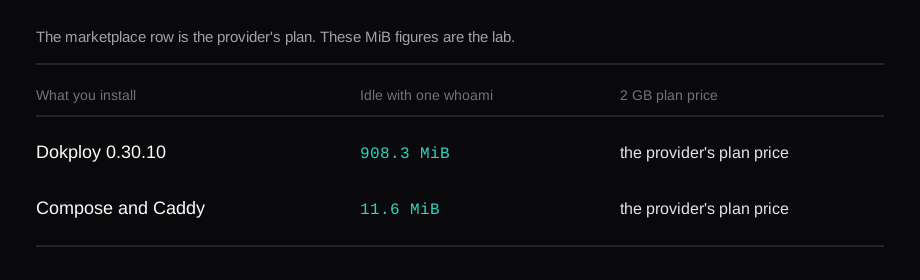
With one app, the panel is almost all of the container memory. Dokploy at 908.3 MiB is 46 percent of this guest's 1,967.6 MiB, and MemAvailable in that window was 692.0 MiB. Coolify's with-whoami window was 537.5 MiB. The earlier window, 647.1 MiB, was the same panel before I recreated the container. CapRover at 57.9 MiB is nginx plus a small Node process. Compose at 11.6 MiB is Caddy plus whoami.
Dokku is the git-push case. The container stayed at 2.2 MiB, the app was back in 13 seconds, and the 1.435 GB herokuish image is yours to delete once the build is done. CapRover is the panel that cost 57.9 MiB. Coolify and Dokploy were already the workload, 537.5 MiB and 908.3 MiB, while whoami itself was 1.8 to 2.2 MiB.
The price on a 2 GB NodeRings plan is the provider's, and it changes with region and billing. The marketplace filters plans by region, specs, price, and billing. The MiB figures are from this lab.
FAQ
Does Dokploy use less RAM than Coolify?
On this guest, Dokploy 0.30.10 idled at 908.3 MiB with one whoami, and the dokploy container was 841.7 of that. Coolify 4.5.3 idled at 537.5 MiB in the window after the panel container was recreated, and at 647.1 MiB in the window before that. whoami was 1.9 MiB in both products.
Can CapRover run on 1 GB?
The same disk, booted at qemu -m 1024, had MemTotal 984,196 kB. whoami was running, HTTP returned the whoami hostname, and the out-of-memory counter in dmesg was 0. One reading a minute after boot summed the containers to 181.7 MiB. That reading is one sample during startup. The 20-round idle on 2 GB was 57.9 MiB. The lab CA file was absent from nginx's conf.d after that boot, and HTTPS on 443 was the default page.
Does Coolify still use Docker Swarm?
This install reported Swarm=inactive. The Swarm docs call it experimental and deprecated, and say it is removed in v5. Dokploy and CapRover were Swarm=active on this one node. Dokku and Compose reported Swarm=inactive.
Can I install two panels on one VPS?
They both bind 80 and 443. I installed each one on its own disk and destroyed the guest between them. A second panel on the same daemon binds those ports again and writes routes for its own proxy.
Is all of Dokploy Apache-2.0?
On tag v0.30.10, LICENSE.MD puts the code outside /proprietary under Apache-2.0. The proprietary tree is the Dokploy Source Available License 1.0. Production use of that tree needs a commercial agreement. Development and testing can copy and modify it without a subscription. The tree is in the tag. The whoami app stayed outside it.