
Guest C asked who has 192.0.2.11. Guest B answered, from fa:c0:42:6a:39:a0. Then guest A, which already held 192.0.2.10/24 on the same bridge, added 192.0.2.11/24. The next request drew two replies. B answered again. A answered too, from c6:21:38:f5:a4:5f. C's echo request followed B's MAC. A's reply was already on the bridge, one line under B's.
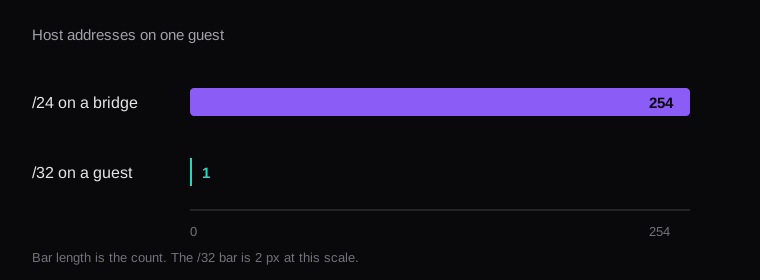
A /24 is 256 addresses. Two of them are the network and the broadcast, so 254 are host addresses. A bridge that carries that prefix lets a guest claim any of those 254 it can add to its interface. A /32 puts one address in the local table. The main routing table on that guest has a default route, and the subnet route is gone.
What a bridged /24 lets one guest claim
The lab was three network namespaces on one bridge, br-doc. The bridge held the three veth ports. A was 192.0.2.10/24, B was 192.0.2.11/24, C was 192.0.2.12/24. 192.0.2.0/24 is the documentation prefix, kept off the public internet. A's main table, before the extra address, was one connected route.
One namespace looks like this, and B and C repeat it with 192.0.2.11 and 192.0.2.12:
ip link add br-doc type bridge
ip link set br-doc up
ip link add vethA type veth \
  peer name vethA-br
ip link set vethA-br master br-doc
ip link set vethA-br up
ip netns add leakA
ip link set vethA netns leakA
ip netns exec leakA \
  ip link set vethA name eth0
ip netns exec leakA ip link set eth0 up
ip netns exec leakA \
  ip addr add 192.0.2.10/24 dev eth0
The claim is a second address on A:
ip netns exec leakA \
  ip addr add 192.0.2.11/24 dev eth0
ip -4 route
192.0.2.0/24 dev eth0 proto kernel \
scope link src 192.0.2.10That route is the leak. The kernel treats every host in 192.0.2.0/24 as on-link. Adding 192.0.2.11/24 is a legal address on that link, and the guest will answer ARP for it. The capture is tcpdump -n -e -i br-doc arp. The figure keeps the packet text and leaves the clock off.
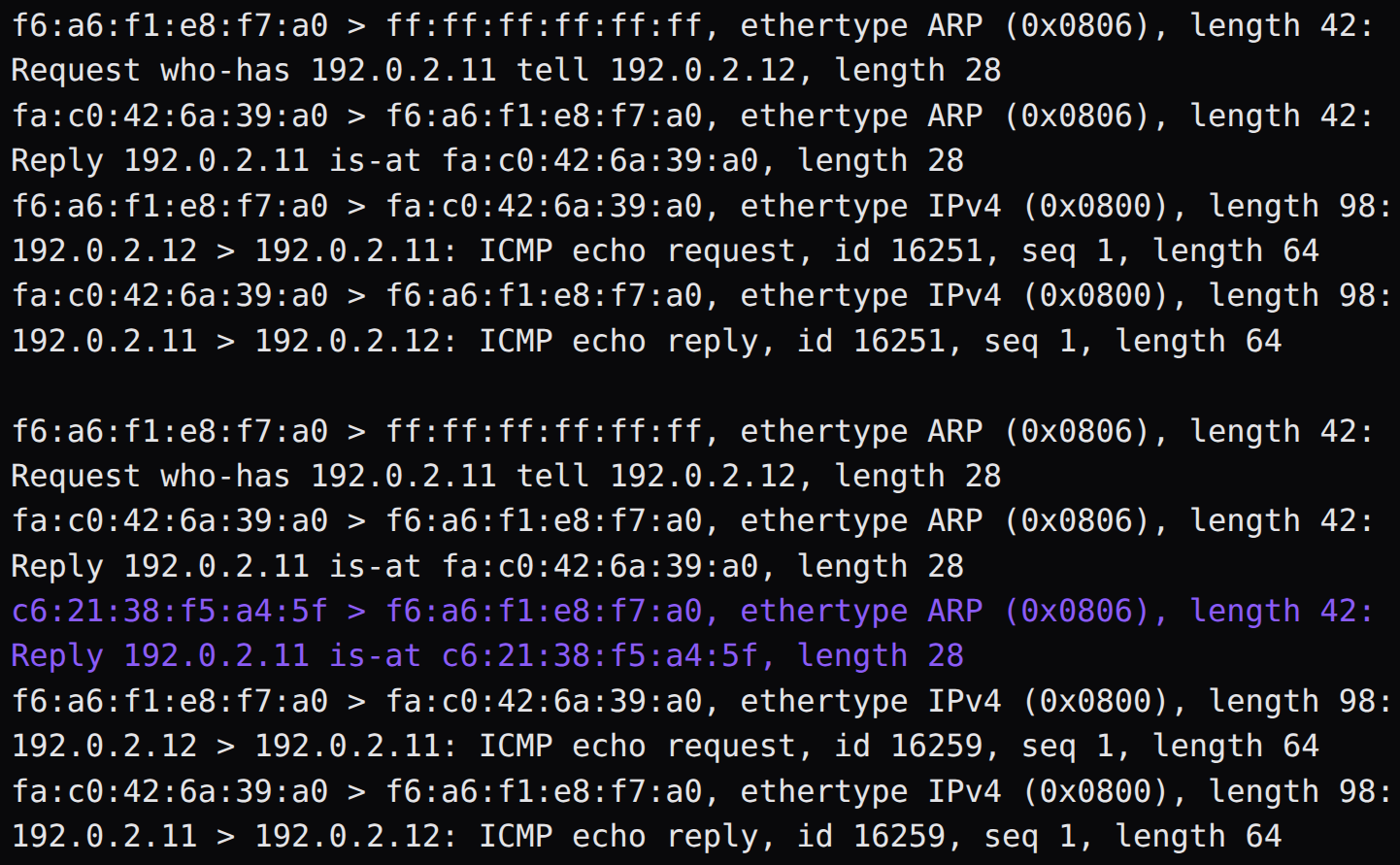
The first exchange is the honest one. C broadcasts, B replies, C sends the echo to B, B replies to the echo. After A adds the address and C flushes its neighbor cache, the same request gets B's is-at and then A's. The echo that follows goes to B, the MAC C installed from the first reply. A working ping and a second claimant can share the same second.
Adding the address left the capture quiet until the next request. A spoke when C asked. A guest that only answers who-has requests stays quiet until something on the bridge looks the address up, and a ping that already holds a neighbor entry keeps that MAC. Flushing the cache is what made the second reply visible.
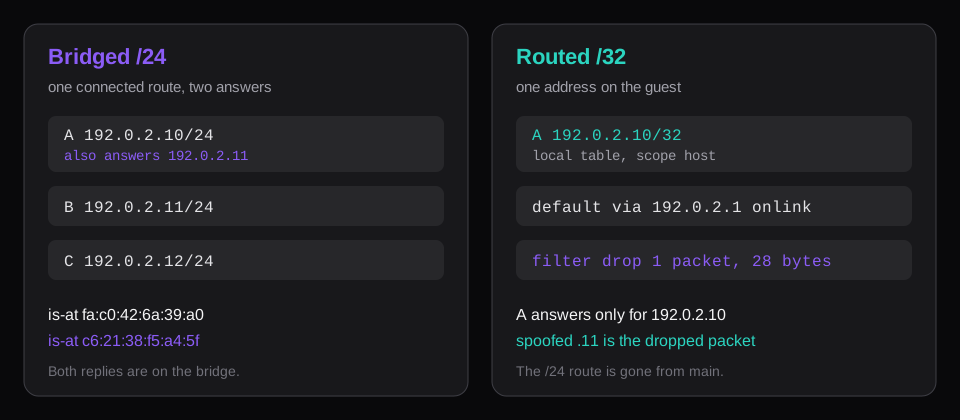
A /24 on the bridge and a /32 on the guest are different objects. The prefix you own can be a /24. The mask you write on the guest is what creates the connected route. Those two numbers get copied from each other in a cloud-init line, ip=192.0.2.10/24, and the guest installs the route this lab printed.
What a /32 puts in the routing table
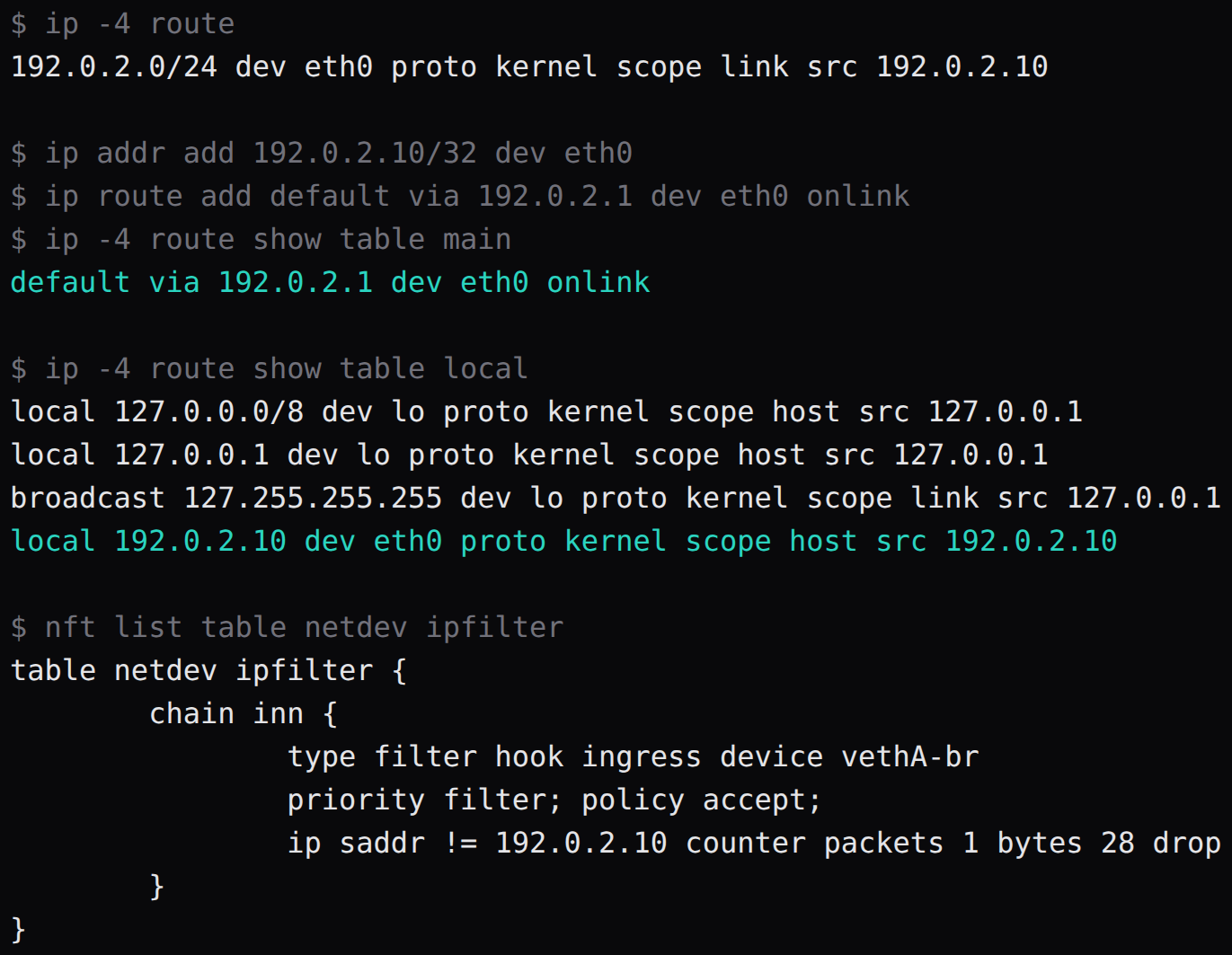
Flush the /24 off A, add 192.0.2.10/32, and add a default via 192.0.2.1 with onlink, because the gateway is outside the address the guest holds.
ip addr add 192.0.2.10/32 dev eth0
ip route add default via 192.0.2.1 \
  dev eth0 onlink
ip -4 route show table main
ip -4 route show table local
The main table came back with one line, default via 192.0.2.1 dev eth0 onlink. The local table held local 192.0.2.10 dev eth0 proto kernel scope host. Both tables list that host and the default. The /24 route is gone from both. A has one host address, and the other 253 hosts go out through that default.
That is the cloud-init version of the same bug. A pool can be 192.0.2.0/24, meaning the host has 254 host addresses to hand out. The line inside the guest is one address and a mask. A mask of /24 teaches the guest that it lives on the whole pool. A mask of /32 teaches it that it lives on one address and that everything else goes to the gateway the pool already stored.
How Hetzner routes one extra address
Hetzner's Proxmox tutorial is the page that shows up for a dedicated server with extra IPs. Additional subnets, single failover IPs, and failover subnets are MAC-bound and statically routed to the server's main IP, so the working pattern they document is routed. The bridge's port list is empty. Their example uses documentation addresses, the same family as this lab.
address 198.51.100.10/32
bridge-ports none
bridge-stp off
bridge-fd 0
post-up ip route add \
  192.0.2.20/32 dev vmbr0
bridge-ports none is the whole difference from the lab bridge. vmbr0 has the main IP as a /32. Each extra address is a /32 route on that bridge. Forwarding has to be on. The same page says a default Hetzner install leaves forwarding disabled. In bridged mode the host is transparent, the guest's MAC is what the upstream router sees, and they tell you to request a virtual MAC per single extra IP. A source MAC outside the set the router already learned is what they describe as an abuse flag, and a reason the server can be blocked. A virtual MAC is available for a single extra IP. A subnet stays on the routed setup.
This bridge was namespaces and veth pairs. The ARP lines are what a /24 on a bridge does. The Hetzner page is what the upstream switch does when that bridge is the public port.
What the IP filter counts
The Proxmox VE firewall manual calls the option IP filter, ipfilter: 1. It is the same move as an empty ipfilter-net set on every interface. For a container, the configured addresses go into that set. For a VM, you list them. The manual's rule for the set is outgoing traffic whose source sits in the set. A source outside it is dropped. The example in the manual is an ipset named ipfilter-net0 containing one address.
On this bridge the same shape was one nftables ingress rule on the port facing A. The rule drops an IPv4 source other than 192.0.2.10. A raw datagram, 28 bytes, left A with source 192.0.2.11. The counter read 1 packet and 28 bytes. After the /32, A's local table lists 192.0.2.10 and the main table lists the default. The filter drops a packet whose source is 192.0.2.11, including one a raw socket forges while that address sits on B. The 28-byte datagram is that packet. The counter is the drop.
nft add rule netdev ipfilter inn \
  ip saddr != 192.0.2.10 \
  counter drop
That rule is the lab's copy of the manual's filter, on a bridge port, and the counter is the drop. The manual's option is the one you tick on the VM, and the address in the set has to be the address IPAM handed out, or the guest's real traffic dies with the spoof.
What to put in IPAM
NodeRings IPAM stores a network, then prefixes. Each prefix has a CIDR, a gateway, an allocation strategy, and an optional reserved list. A customer VM gets a static IPv4 and a static IPv6 through cloud-init, plus that gateway and the DNS resolvers on the network. The platform requires dual-stack. The assigner walks the free addresses in the pool.
The docs tell you to mark the gateway, and any address the router or another customer already uses, as reserved, so the assigner leaves them alone. Reserved addresses stay out of automatic assignment and remain in the prefix utilization. The reserved list is the control the page documents for a gateway inside the CIDR. A gateway you forget to reserve is a customer address on the next create.
Marketplace preflight wants 5 free IPv4 addresses and 10 free IPv6 addresses in that pool, or the plan stays off search. Five is a thin floor on a /24. What the block costs once you have bought it is in What an IPv4 address costs a $4 VPS. The leak is the mask written on the guest. You can pay for 254 host addresses and then hand a guest a connected route for all of them.
Keep the pool's prefix length on the prefix. Keep the guest's mask at /32, with the gateway the prefix already stores, on-link if the gateway sits outside that one address. Keep the gateway on the reserved list. A gateway left off that list is the next address the assigner can hand out, and the VM that receives it sits on the address every other guest uses as its gateway.